/images/avatar.png

Cloud.Virt.AI.Sec

Cloud · Virt · AI · Sec

Welcome to Cloud.Virt.AI.Sec

Automated Nested TKGs Lab Environment Script

After diving into vSphere with Tanzu for a while, I was blown away by how powerful the platform is. But let’s be honest—the cost of setting up a proper learning environment can be pretty steep.

After spending some time researching and experimenting with different approaches, I discovered a way to create a complete nested environment without breaking the bank. I’m excited to share this automation approach in this blog post, hoping it helps others who want to learn vSphere with Tanzu quickly and affordably.

First Class Disks (FCD) Explained

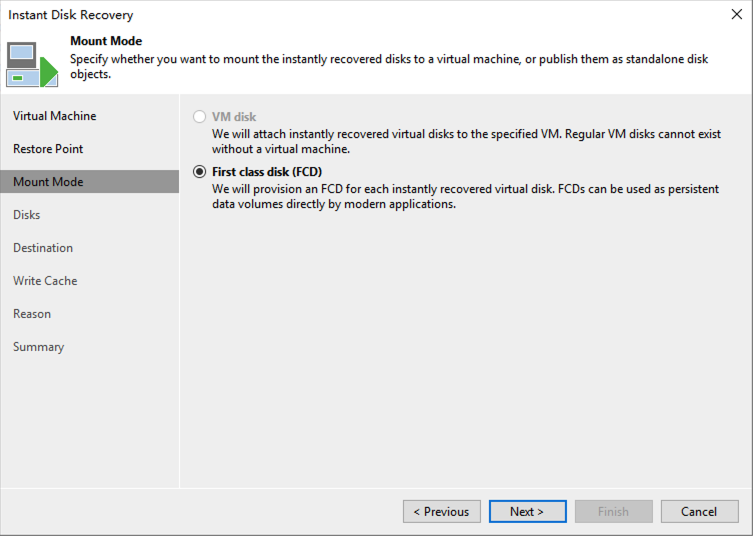
After Veeam released version 11, observant readers might have noticed this option when performing Instant Disk Recovery:

https://s1.ax1x.com/2022/03/23/q3e6I0.png

Starting with vSphere 6.5, VMware introduced a completely new disk format called “First Class Disks” (FCD). The name is certainly bold, and in fact, these virtual disks do have their own unique “privileges.” Today, I’d like to explain these FCDs in detail.

Exploring Tanzu Community Edition in the Homelab

I recently refreshed my homelab setup and decided it was time to dive into Tanzu. When VMware open-sourced Tanzu Community Edition last year, I knew this was the perfect opportunity to set up a complete environment with Kasten K10 and Veeam Backup & Replication to really put it through its paces.

Hardware Setup

My environment consists of two machines - a Dell Precision M4800 that’s been serving me faithfully for over six years, and a newly added NUC11 Panther Canyon. The Dell laptop is really just playing a supporting role in this setup, while the Panther Canyon is the star of the show with these specifications:

vCenter Converter Retired – How to Handle P2V Now

Earlier this month VMware announced that they’re removing vCenter Converter from their product download list. That means we’ll no longer be able to download this product from VMware’s official website. VMware’s official stance is that vCenter Converter hasn’t been updated for years, has some security vulnerabilities, and isn’t very stable. In my view, VMware has taken down their most powerful weapon.

What Could This Tool Do?

Many readers may never have encountered this tool, but for VMware administrators, it was essentially their best partner. The installation rate of this tool was incredibly high - among VMware’s entire product lineup, it was second only to vCenter. In most environments, administrators would install vCenter Converter immediately after installing vCenter.

Veeam Hardened Linux Repository Configurator

Script Purpose

According to Veeam best practices, this one-click script configures a Linux system. After the operating system configuration is complete, you can return to the VBR console to complete the repository addition.

For manual configuration and principle introduction, please refer to the following posts:

veeam-v11-hardened-linux-repository-配置指南-centos8

加固的备份存储库hardened-repository配置指南-ubuntu

veeam-hardened-repository-quick-starter

Prerequisites for Use

  1. Ensure the system meets the minimum requirements for using Veeam Hardened Linux Repository.
  2. The server has unformatted disks such as /dev/sdb, /dev/sdc, etc.
  3. This script must be run using the root account.

System Requirements

This script has been tested on Redhat 8.2/CentOS 8.2/Ubuntu 20.04 and above versions. Other system versions are not currently supported.

Veeam Agent for Linux Installation Deep Dive

1. Components & Roles

Veeam Agent for Linux (VAL) has two parts: the Veeam binaries and the VeeamSnap kernel module. On CentOS/Red Hat, you typically install:

veeam-<version>.rpm
veeamsnap-<version>.rpm

VeeamSnap handles snapshots and CBT; the Veeam package installs everything else. When you install veeam, it automatically pulls in veeamsnap as a dependency.

2. Installation Path

VAL relies on the distro’s package manager to fetch dependencies (see “Veeam Agent for Linux Basics”). Push installs from VBR hide the complexity, but special cases exist.