Your 24/7 Veeam AI Expert: How Veeam Intelligence Revolutionizes Backup Management Support
A New Era of Intelligent Data Protection—Unveiling the Powerful Capabilities of Veeam Intelligence
Introduction: The Painful Experience of Late-Night Documentation Searches
It’s 2 AM. Your backup job has failed again.
The screen displays the error “Failed to create snapshot” and your mind goes blank. If you’re a Veeam administrator, you’ve been here before.
The familiar troubleshooting marathon begins:
- Google the error code → 30 minutes gone
- Search through Veeam documentation → Another 45 minutes wasted
- Ask for help in WeChat groups → Wait for responses
- Open a technical support ticket → Queue for hours
Six hours later, you finally solve it. A simple permission configuration issue.
You’ve probably experienced this pain too many times: network port configuration confusion, complex SureBackup setup, performance optimization challenges… Each time, you get lost in the vast sea of documentation.
Now, this pain may become history.
Veeam Intelligence, the AI assistant in the Veeam product family, is changing how we work completely. It’s built into Veeam Backup & Replication and integrated into other Veeam products like Veeam ONE, providing intelligent support for the entire data protection ecosystem.
This article focuses on Veeam Intelligence applications in Veeam Backup & Replication, with future content exploring its unique value in other Veeam products like Veeam ONE.
Core Capabilities: Your 24/7 Expert Team
Veeam Intelligence isn’t just a Q&A tool—it’s your complete expert team. In Veeam Backup & Replication, it plays whatever professional role you need: architect, support engineer, security consultant, or development engineer. In other Veeam products like Veeam ONE, it adapts to provide intelligent support for monitoring, reporting, and analysis tasks.
🏗️ Architect Role: Your System Design Advisor
When you’re planning complex environments, Veeam Intelligence analyzes your VM count, business types, and RTO/RPO requirements to deliver complete architecture solutions. It helps you predict storage growth and suggest expansion timing, identifies single-point failure risks, and provides redundancy solutions. Most importantly, it finds cost-effective hardware investments while meeting your business requirements.
🔧 Support Engineer Role: Your Troubleshooting Assistant
When production issues strike, Veeam Intelligence quickly analyzes error logs and pinpoints root causes. It checks relevant configuration options, discovers related issues, and provides step-by-step troubleshooting guides to help you trace from symptoms to true root causes. Better yet, it offers preventive measures to stop similar issues from recurring.
🛡️ Security Consultant Role: Your Data Security Expert
Facing data security threats and compliance requirements? Veeam Intelligence acts as your security consultant, providing comprehensive protection recommendations. It analyzes your current environment’s security risks, recommends appropriate Malware Detection configurations, and delivers protection strategies based on the latest threat intelligence. Notably, it provides targeted security configuration guidance based on Veeam’s latest security feature updates from v12 to v13, ensuring your data protection system meets current security standards and compliance requirements.
💻 Development Engineer Role: Your Automation Partner
When you need automation scripts or system integration, Veeam Intelligence automatically generates PowerShell and Python script templates, provides REST API examples, and delivers complete technical integration solutions. This significantly lowers the barrier to automation development—what once took weeks now takes days.
Latest Highlight: Based on enhanced foundation mode and visible thinking process, each role demonstrates AI’s professional analysis logic, ensuring accurate and actionable recommendations.
New Features of Veeam Intelligence in Veeam Backup & Replication
Based on the latest updates, Veeam Intelligence capabilities in Veeam Backup & Replication have taken a quantum leap. These features have similar applications in other Veeam products like Veeam ONE, but this article focuses on VBR scenarios:
🎯 Natural Language Conversation with Voice Support
Imagine solving problems like chatting with colleagues: “My backup job failed last night, error code 2934, affecting my financial database backup. What should I do?” Veeam Intelligence understands your problem description completely and provides precise solutions.
Even better, it supports voice input/output functionality. While drinking your morning coffee, you can say “Report on last night’s backup situation,” and the AI assistant immediately provides detailed reports. This natural interaction makes daily operations work more relaxed and pleasant.
🎯 Thinking Mode Support
Veeam Intelligence follows mainstream AI development trends and introduces the Visible Thinking Process feature. This has become standard in conversational AI, and Veeam brings this convenience to the data protection field.
In Thinking mode, the AI assistant shows its complete analysis process: from understanding the problem’s core, to accessing relevant knowledge bases, to reasoning to conclusions. This transparent approach lets you know not just “what” but also “why.”
This design helps users better understand AI’s decision-making logic and allows follow-up questions about the reasoning process, creating truly meaningful human-computer conversation experiences.
🎯 Basic and Advanced Modes
Veeam Intelligence specifically designed two working modes to balance functional convenience with data privacy protection:
Basic Mode: Runs entirely on Veeam’s public knowledge base, with all data processing completed locally without sending your specific environment information to external services. While it can’t access real-time data from your current VBR server, it’s perfect for learning Veeam concepts, understanding best practices, and consulting configuration methods.
Advanced Mode: More powerful, this mode can directly query your VBR server information. It transmits relevant data from your backup server to Veeam’s AI models, utilizing cloud models to analyze situations related to data on your backup server and provide recommendations. The examples in this article were all completed using this mode.
🎯 China User-Friendly, No VPN Required
This is a major benefit for Chinese users. Veeam Intelligence considered Chinese users’ actual needs from the product design stage, with all services directly accessible domestically without network proxy tools.
The AI assistant supports full Chinese conversation, completely understanding Chinese technical terms and usage habits. You can say “我的备份作业挂了” (my backup job crashed) instead of “备份作业失败了” (backup job failed), and it understands perfectly. The system also optimizes understanding of Chinese enterprise environments, network architectures, and compliance requirements, with recommendations closer to Chinese users’ actual scenarios.
This means Chinese Veeam users enjoy synchronized global AI assistant experiences with faster response speeds and more convenient use—truly localized services.
These new features transform Veeam Backup & Replication from a traditional backup tool into a truly intelligent data protection platform.
Practical Scenarios: Real Applications of 4 Roles
Let’s explore some real usage scenarios to better understand Veeam Intelligence’s capabilities. The following conversations are based on actual problems encountered by partners and customers in my daily work—let’s see how Veeam Intelligence handles them.
Scenario 1: Architect - Your Design Tool
Question: “Based on my current VMware VM backup job situation, can you provide VM backup architecture design suggestions for my environment? For example, analyze my Proxy usage—is it reasonable? Should I add or reduce proxies? Is the data transfer mode correct? Does my repository design meet best practices? Does data transfer performance align with expected daily evening backups?”
Veeam Intelligence Dialogue:
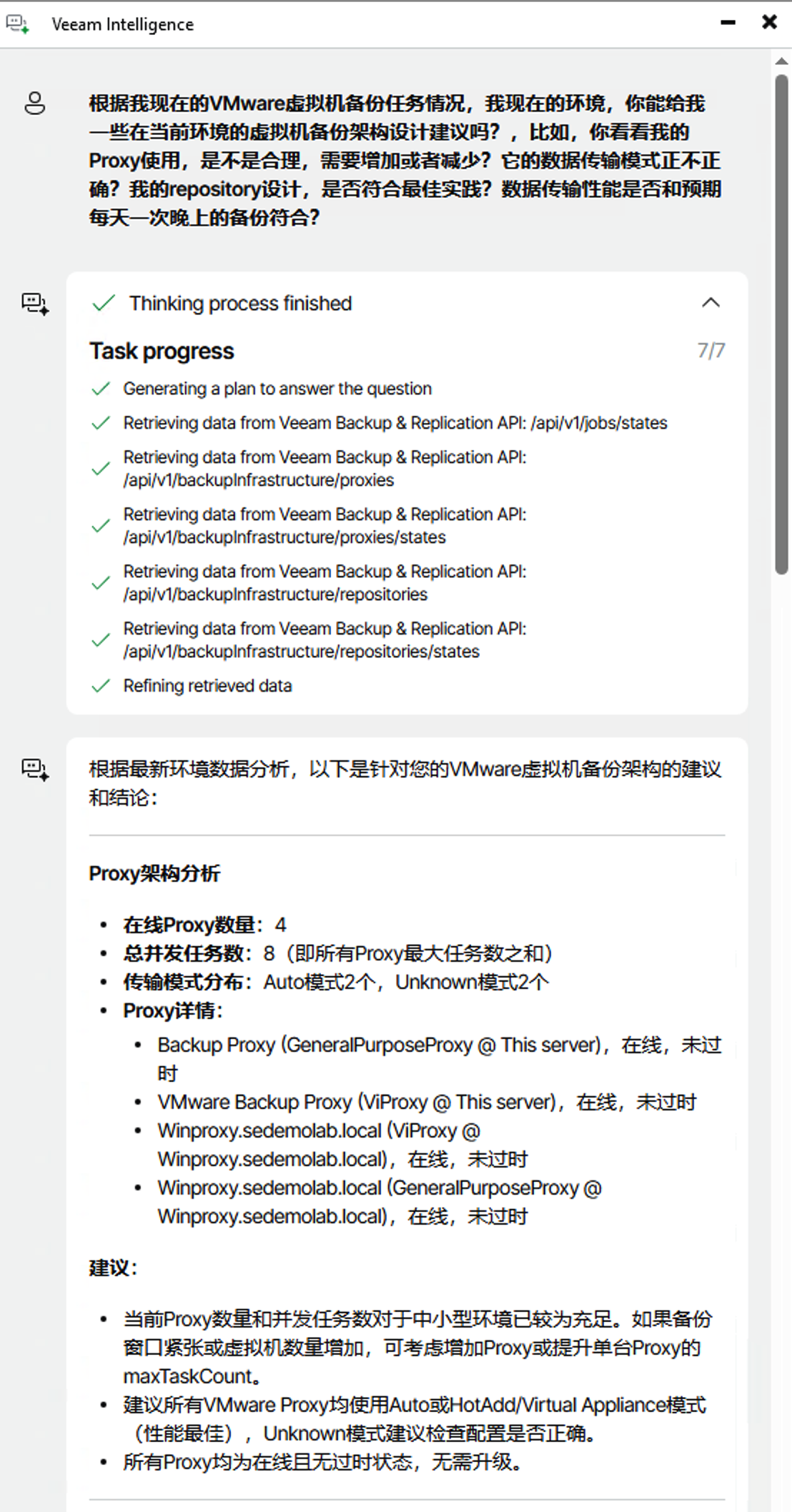
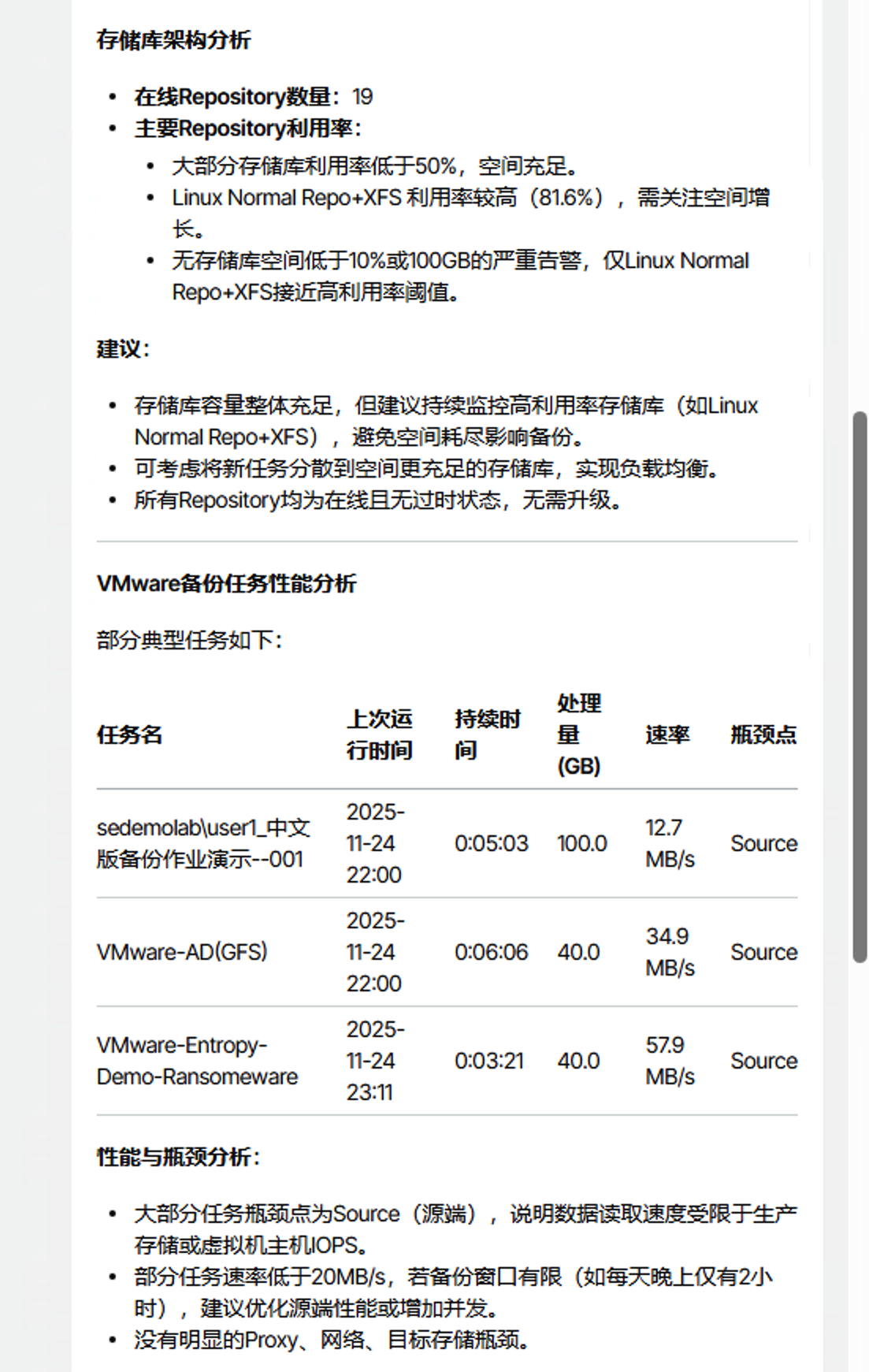
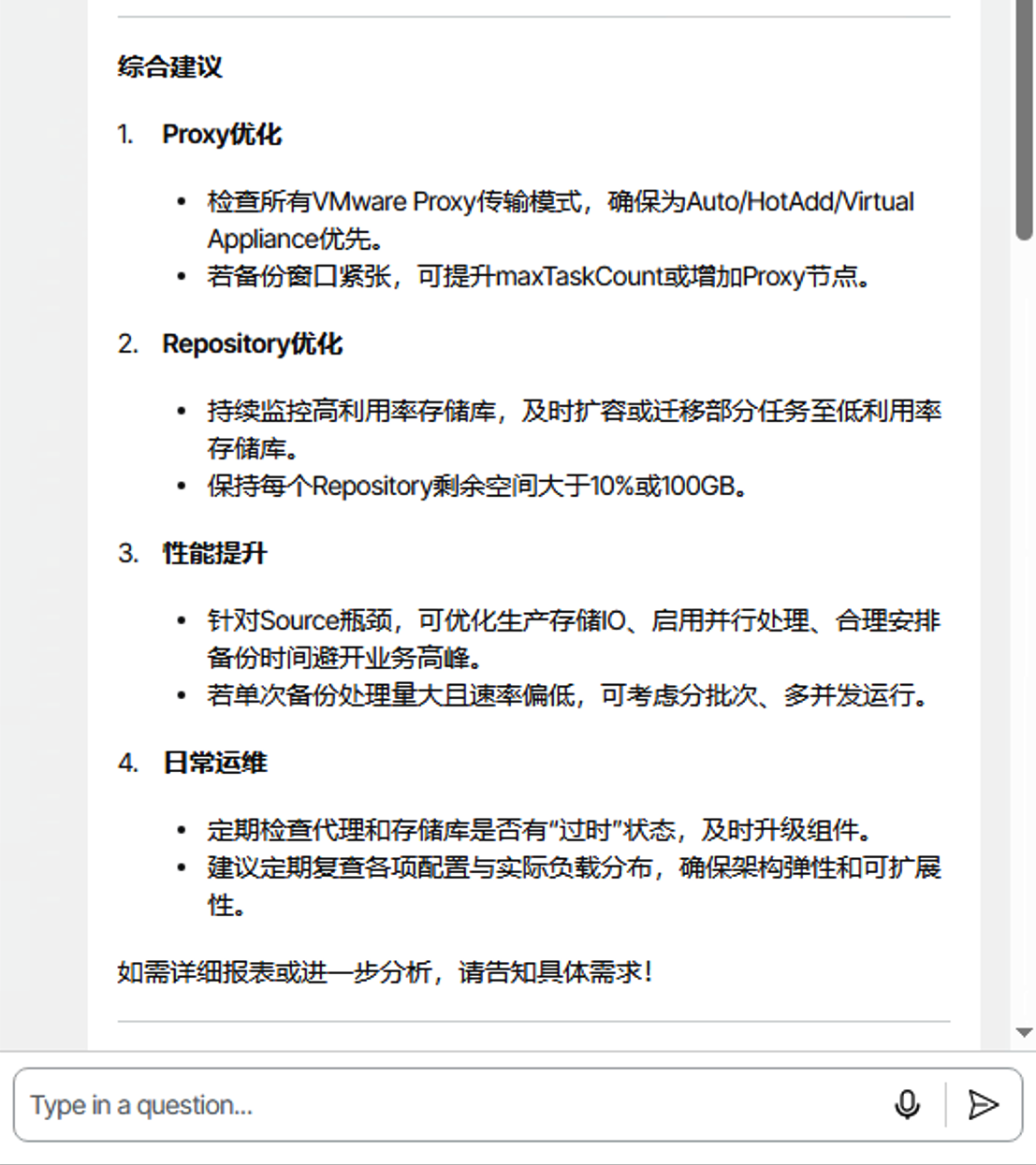
Dialogue Analysis: The conversation shows that Veeam Intelligence first analyzes relevant information in the current environment, then provides optimization suggestions based on the environment and Veeam best practices. From Proxy and Repository aspects to comprehensive recommendations, the suggestions closely match what a professional architect would provide for architecture tuning.
Scenario 2: Support Engineer - Your Troubleshooting Tool
Question 1: “Last night some backup jobs failed. Can you help me analyze the failure reasons?” Question 2: “Look carefully at the failure reasons for the AppData exclude testing task. Analyze in depth why it failed.” Question 3: “Can you look at this task’s session log?”
Veeam Intelligence Dialogue:
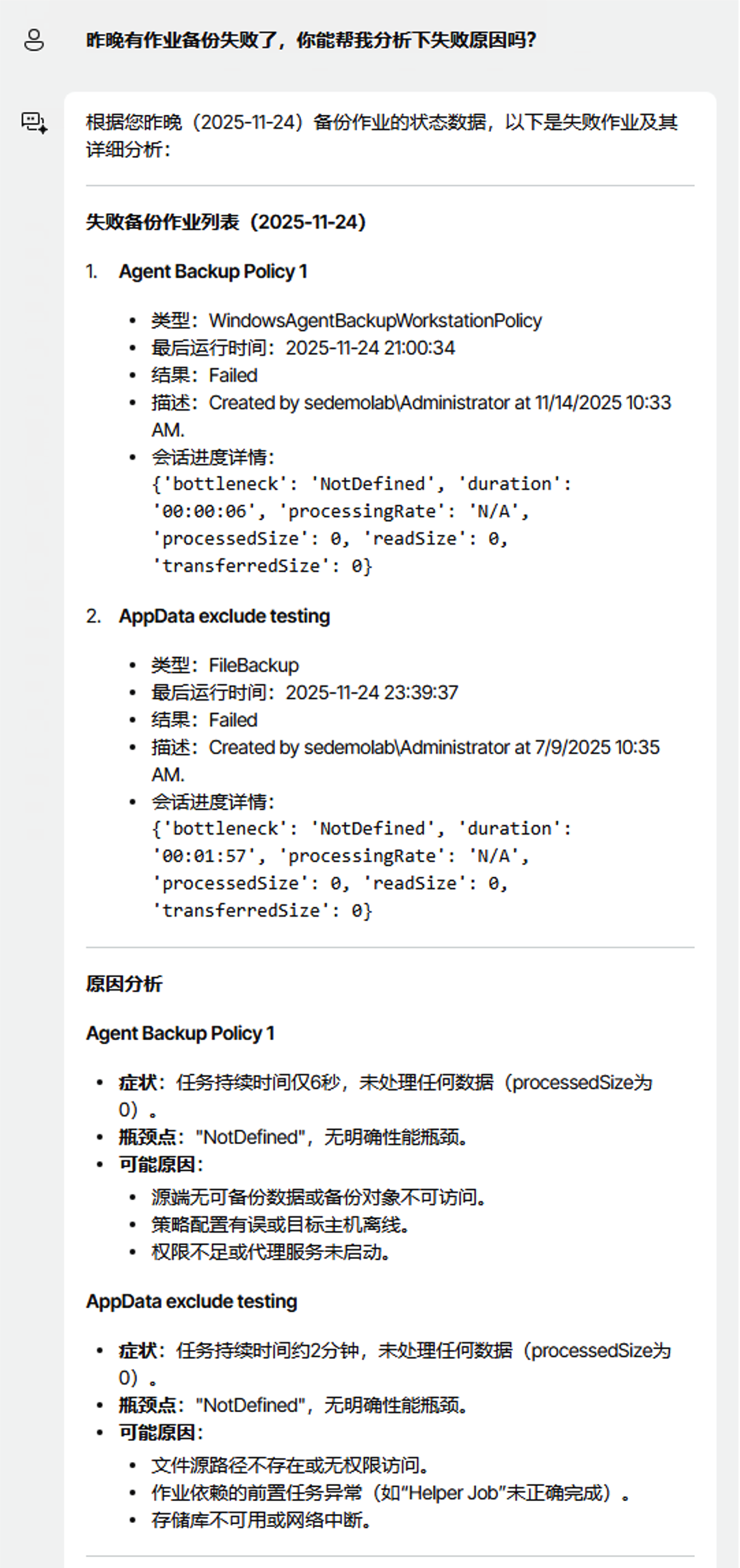


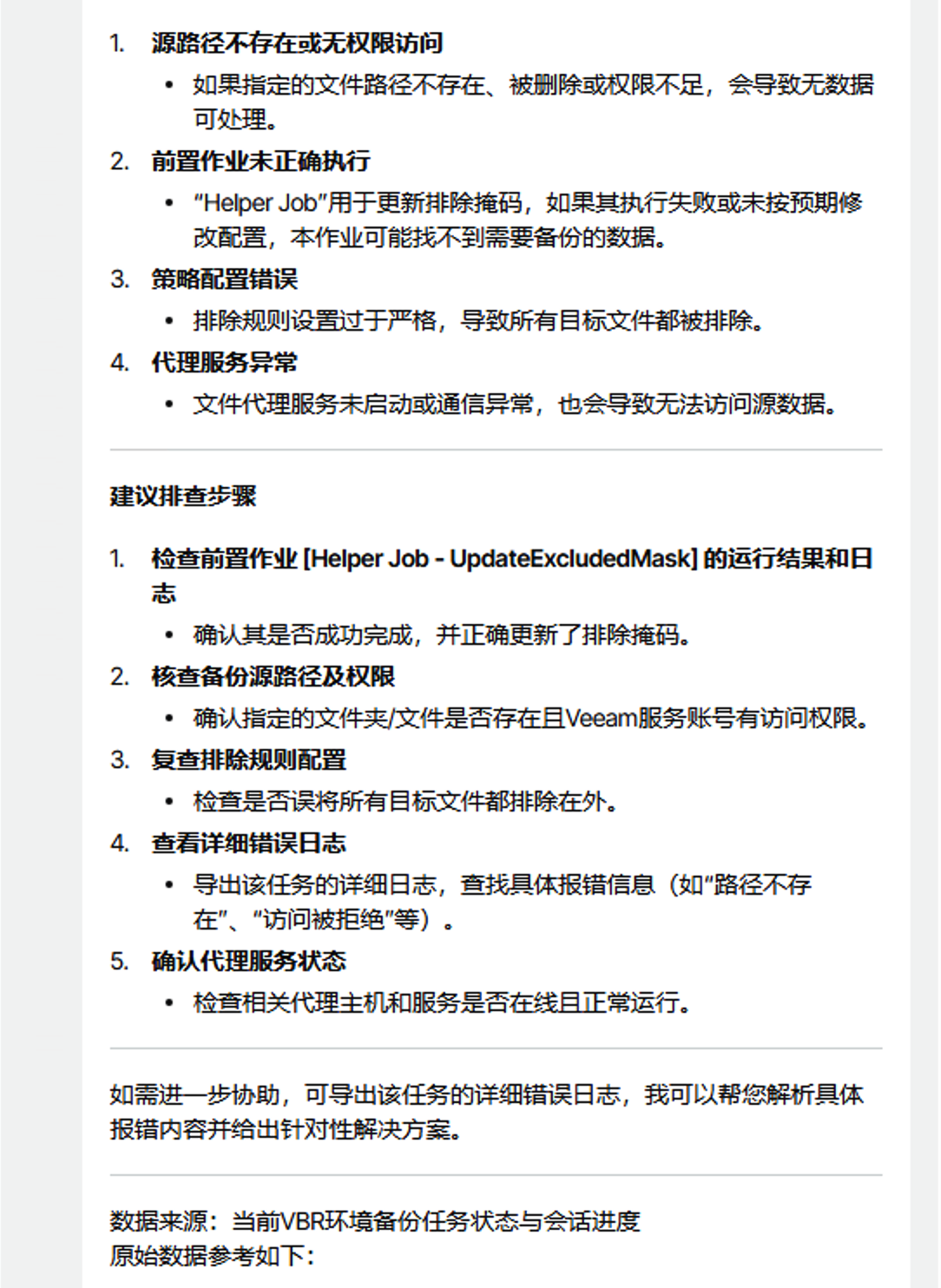
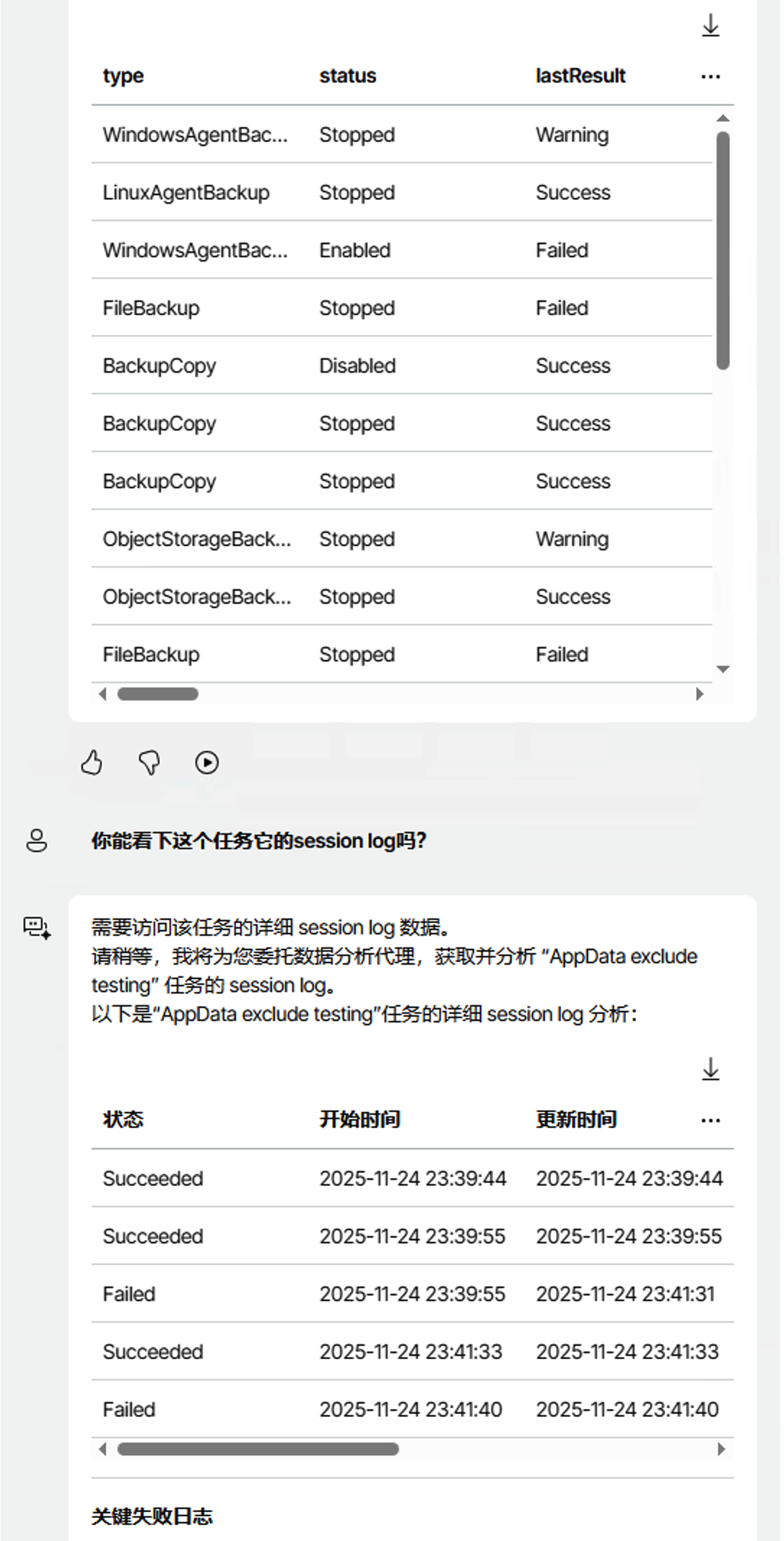
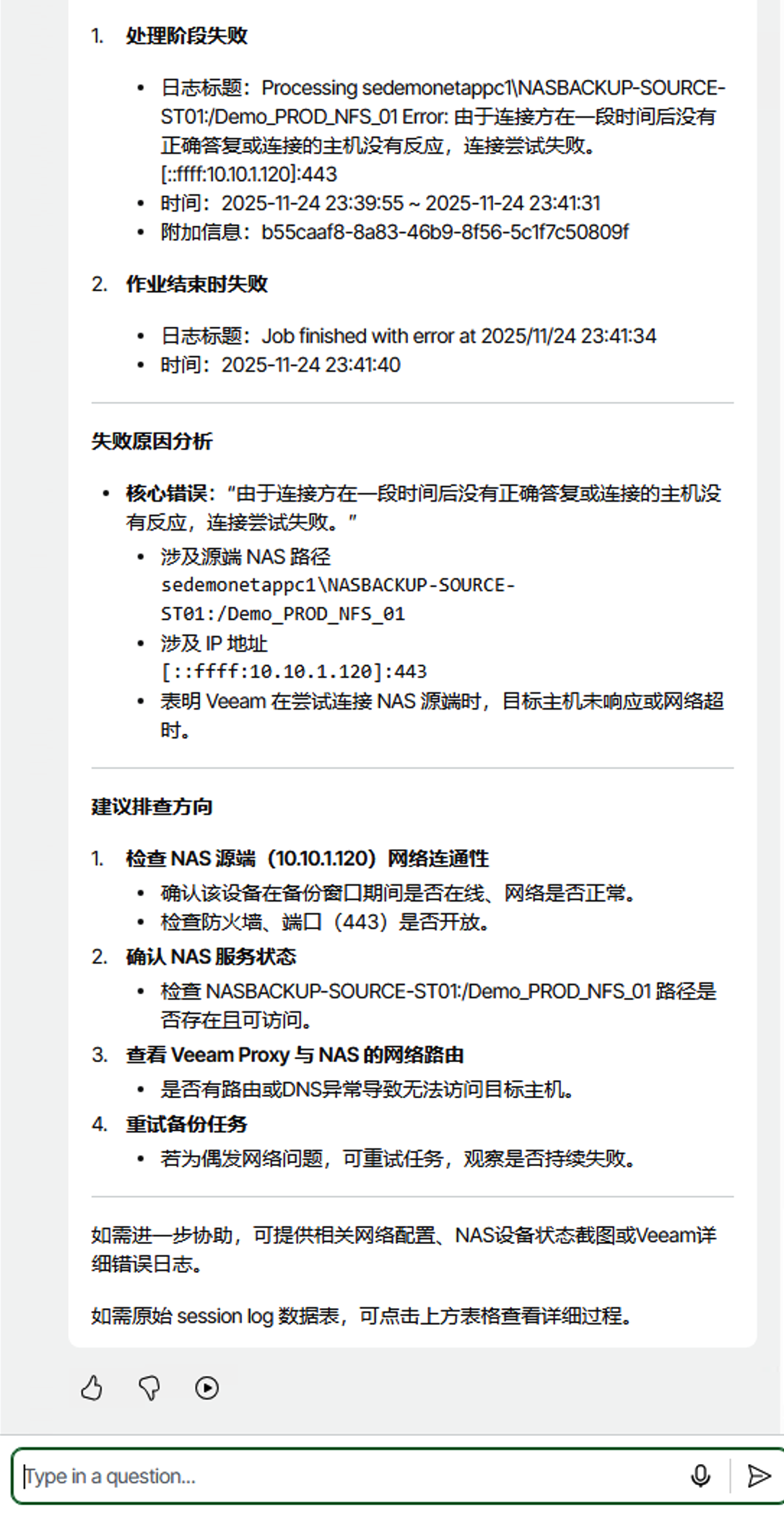
Dialogue Analysis:
Two failed tasks were precisely located, with symptom descriptions, possible causes, and suggested follow-up troubleshooting steps and original reference data provided.
I then followed up about one backup job’s failure reasons, asking Veeam Intelligence to check the Session log. At this point, Veeam Intelligence called and delegated a data analysis agent to start analyzing logs in the Session log, helping me find the accurate task failure reasons. This troubleshooting speed is much faster than opening a support ticket.
Scenario 3: Security Consultant - Your Configuration Guide
Question: “Regarding some configurations in Malware Detection, there are many updates from v12 to v13 that I’m not very clear about. Can you look at my current environment’s configuration situation, see which ones can help me, and give me some configuration guidance?”
Veeam Intelligence Dialogue:
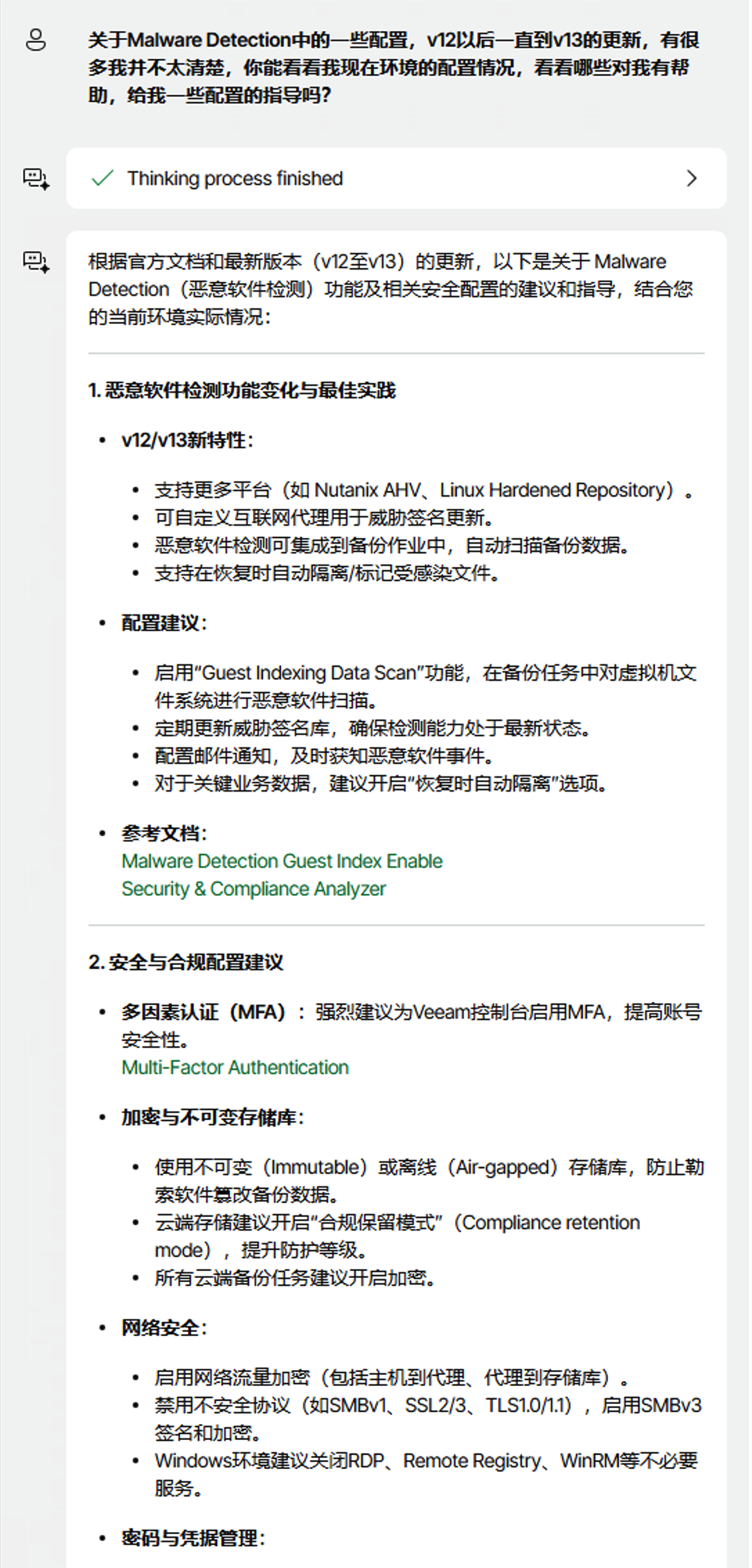
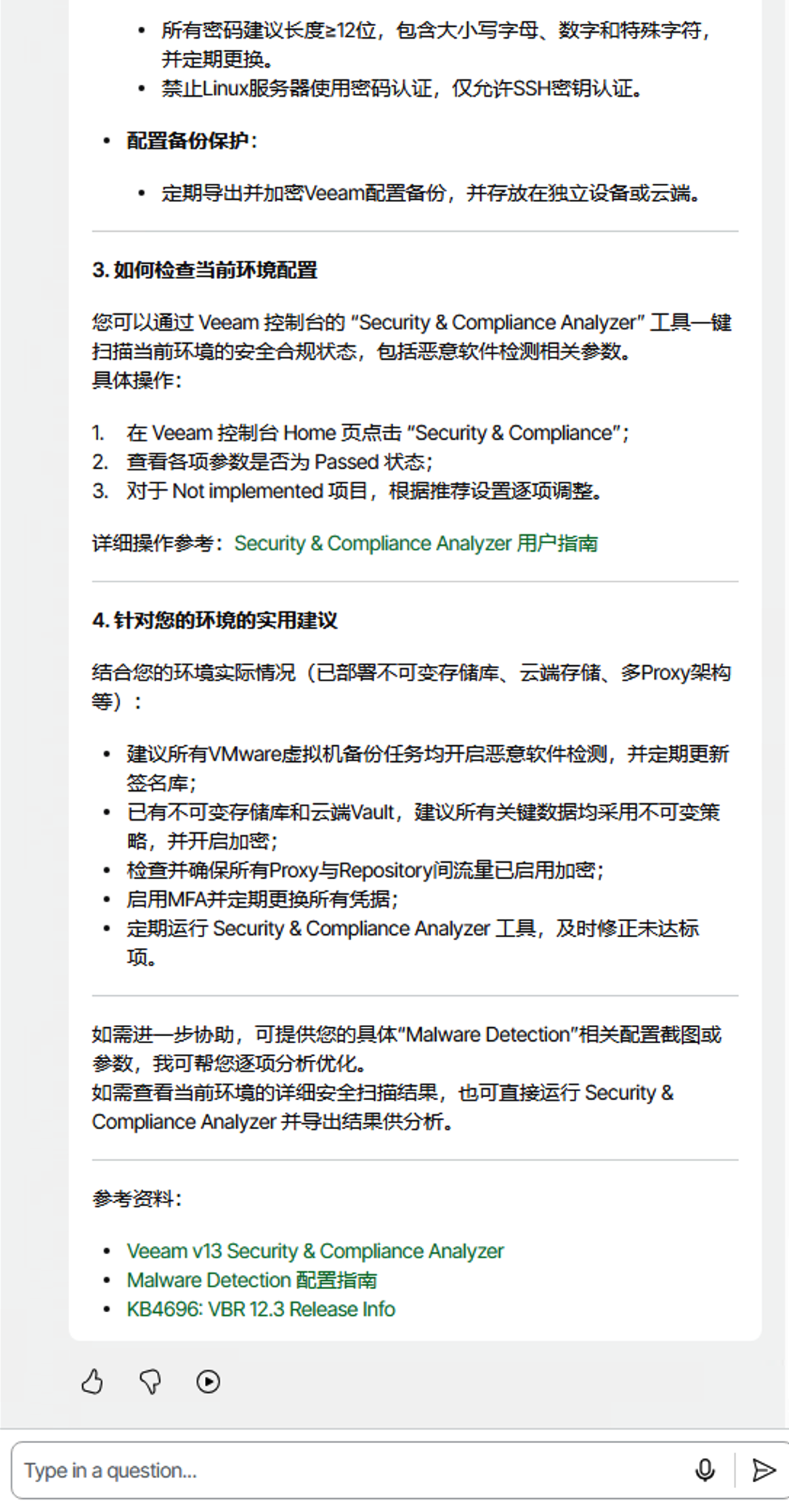
Dialogue Analysis:
The conversation shows that Veeam Intelligence, acting as a security consultant, first analyzed my current environment’s Malware Detection configuration. It accurately identifies problems and deficiencies in existing configurations and recommends more suitable security configuration solutions based on Veeam’s version updates from v12 to v13.
The AI assistant doesn’t just give general security advice but combines my specific environment characteristics to provide customized configuration guidance. It details the role and importance of each configuration item and how to adjust parameters according to different business needs. This security analysis capability based on actual environments makes complex security configuration work simple and easy to understand.
Compared to traditional security configuration document research, this interactive security consultant service significantly improves configuration efficiency while ensuring the effectiveness and timeliness of security measures.
Scenario 4: Development Engineer - Your Programming Partner
Question 1: “I’m developing my backup operations system and integrating it with the company’s internal Grafana. Do you have any integration suggestions for related daily report data?” Question 2: “Great! Can you give me a simple call example? For instance, I need more refined PowerShell collection data. Write me how to get basic job completion status summaries.”
Veeam Intelligence Dialogue:

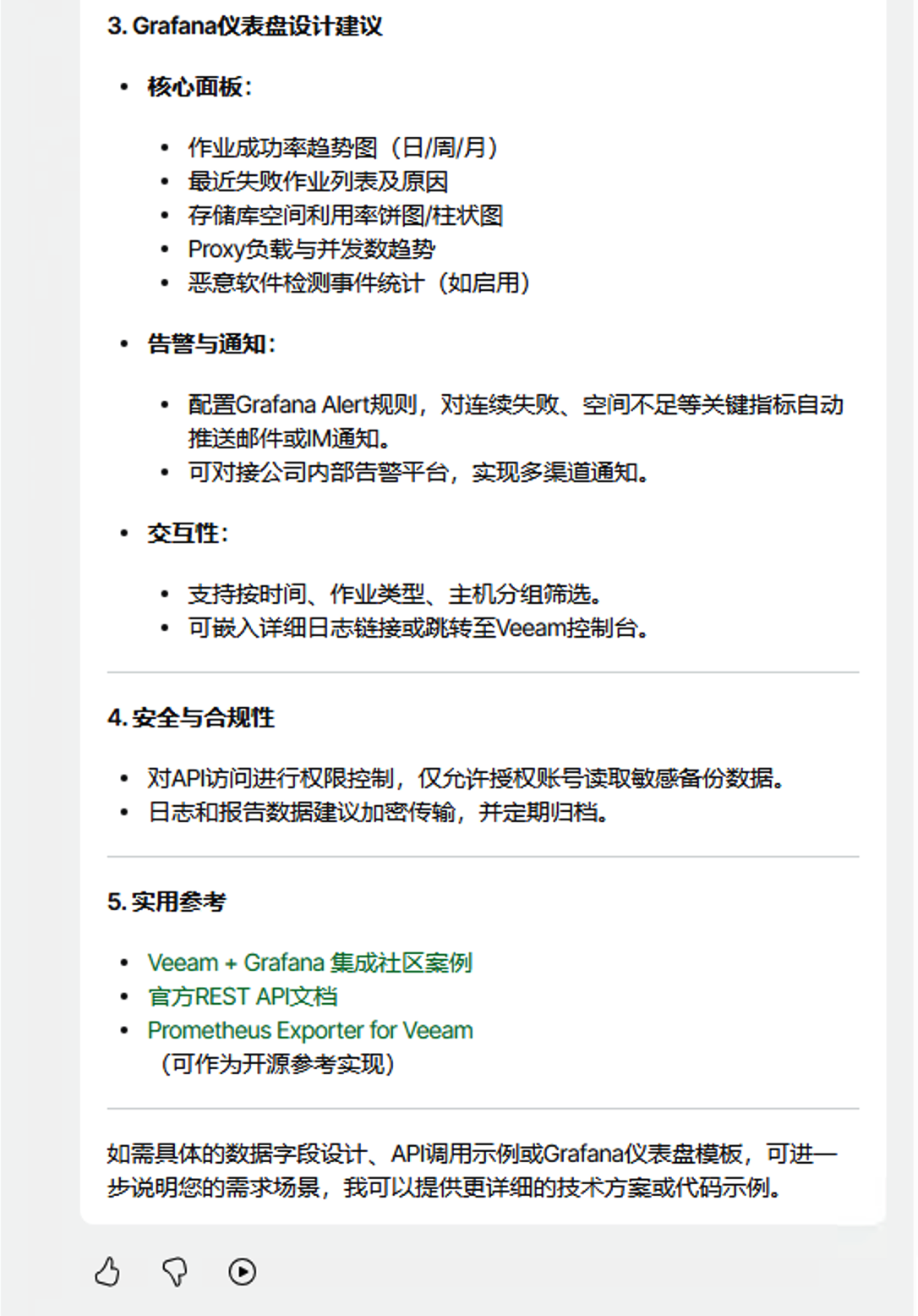
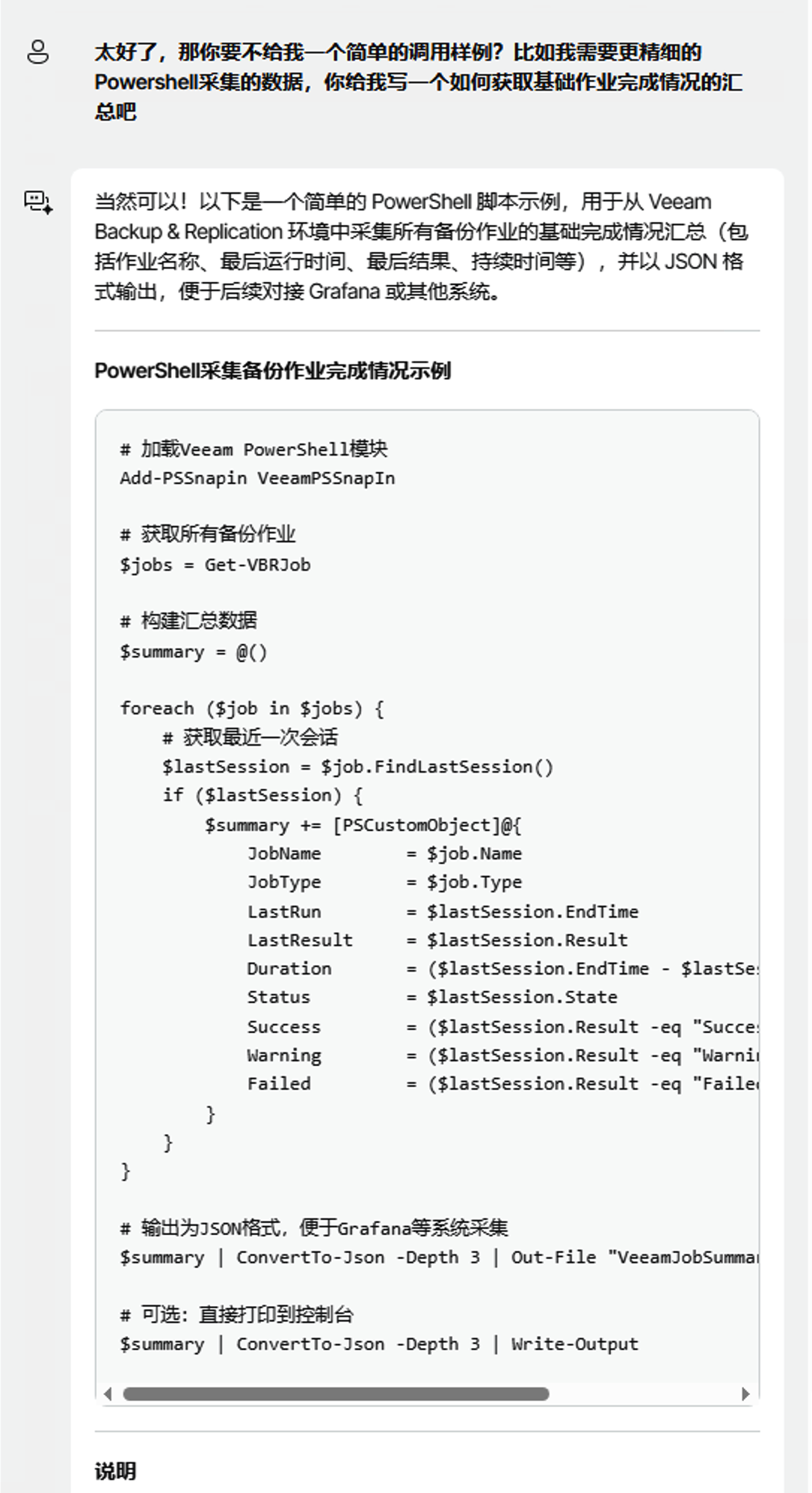
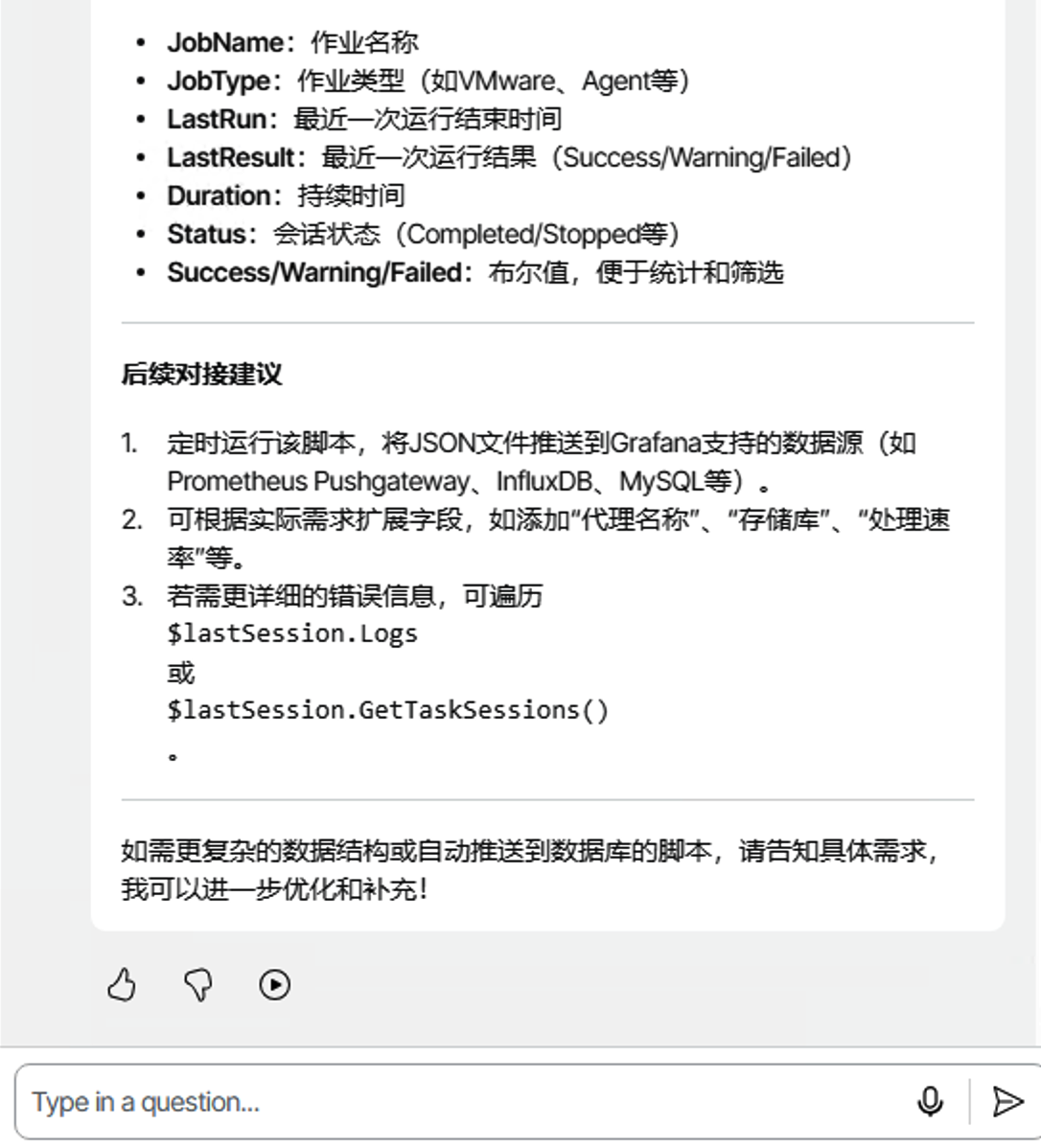
Dialogue Analysis:
This scenario demonstrates Veeam Intelligence’s practical value in development integration. When I proposed integrating Veeam backup data into the company’s internal Grafana monitoring system, the AI assistant first provided overall technical architecture recommendations, including recommended data interfaces and integration methods.
When I requested specific code examples, Veeam Intelligence directly generated complete PowerShell scripts. The script has no syntax problems and considers various operational needs, including key elements like data collection, format conversion, and error handling. From a code quality perspective, it follows PowerShell development standards with detailed annotations. Developers can make slight modifications and use it in production environments.
Compared to traditional API documentation learning and code development processes, this AI-assisted programming approach compresses several days of development time into minutes, while significantly lowering the technical threshold. Even developers with less PowerShell experience can quickly complete these complex integration tasks with AI help.
Usage Guide: How to Make the Most of Veeam Intelligence
To help users fully utilize Veeam Intelligence’s functionality, Veeam provides detailed official documentation resources. Users can gain deep understanding of the AI assistant’s complete features through the Veeam Official Manual. Additionally, Veeam regularly updates the AI Release Knowledge Base Link, where users can get the latest AI feature release information.
Here are some practical tips for better experiences:
Feedback Mechanism: Veeam Intelligence provides feedback buttons for each reply, where users can mark quality as “Good response” or “Bad response.” This feedback helps the Veeam AI team continuously optimize products and models, making answers increasingly align with users’ actual needs. Active feedback helps Veeam provide better services for all users.
Voice Broadcasting: Click the play button on the interface, and the AI assistant converts text replies to real-time voice broadcasting. This feature is perfect for multi-task scenarios—monitoring system status while listening to AI analysis reports without constantly watching the screen.
Usage Limits: Veeam Intelligence has usage limits, with each user having limited usage within 24 hours. Based on current official website limits, daily use remains quite generous and generally won’t trigger the upper limit.
Network Requirements: Stable internet connection is necessary since AI services require internet access.
Conclusion: The Future of Intelligent Data Protection Is Here
Looking back at past experiences of searching through documentation for answers, and then considering the capabilities Veeam Intelligence now provides, we can truly feel the application value of AI in the data protection field.
From passively waiting for support to proactive intelligent answers, from finding needles in haystacks of documentation to precisely locating solutions, from relying on personal experience to intelligent decision assistance—these changes are redefining how data protection work gets done.
Through transparent thinking processes, user feedback mechanisms, code generation capabilities, and real-time knowledge updates, Veeam Intelligence creates a complete intelligent assistance system. It not only improves backup operations efficiency and reduces work burdens but also demonstrates the potential of intelligent technology in the data protection field.
This article focuses on Veeam Intelligence applications in Veeam Backup & Replication. In other Veeam products like Veeam ONE, it provides intelligent support in different dimensions like monitoring analysis, report optimization, and capacity planning—becoming an important intelligent engine in the entire Veeam product ecosystem.
The technical trend of intelligent data protection is clear, bringing new possibilities for industry development.
Perhaps it’s time to completely rethink how we approach data protection work.