Free YARA Rules for Veeam - A Practical Guide to Ransomware.live Integration

In our previous articles, we introduced how Veeam v13 continues to enhance its YARA malware scanning capabilities. However, the limitation of official rule sets is a very real challenge. There aren’t many free YARA rule sources available online, and high-quality ones are even scarcer. Today, I want to introduce you to a hidden gem: Ransomware.live - a professional open-source ransomware threat intelligence platform that provides free YARA rules for 62 major ransomware gangs, making it a perfect complement to Veeam’s YARA scanning functionality.
Meet Ransomware.live: Your Professional Ransomware Threat Intelligence Platform
Ransomware.live is an open-source threat intelligence platform maintained by security expert Julien Mousqueton, focusing on real-time monitoring and analysis of ransomware attacks. The platform tracks 297 attack groups, records over 23,126 victim cases, and its core value lies in providing a professional YARA ruleset for 62 major ransomware gangs.
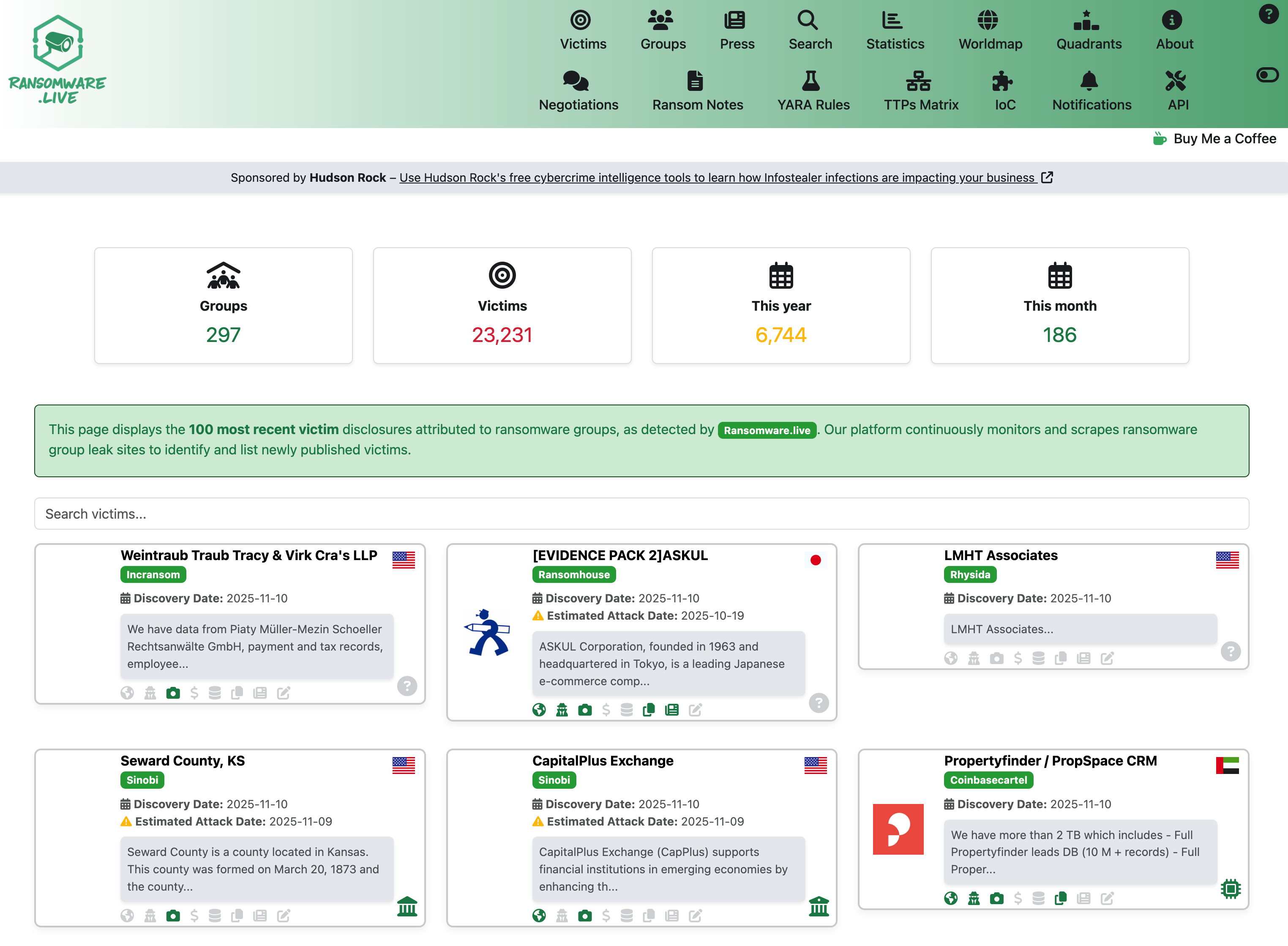
Core Platform Features:
- Real-time Attack Monitoring - Track global ransomware attack activities, showing 297 attack groups and 23,126+ victim cases
- Attack Statistics - Analyze ransomware trends by time, region, and industry dimensions
- Group Profiles - Detailed records of attack characteristics and historical activities for each ransomware group
- Victim Database - Searchable victim information for threat correlation analysis
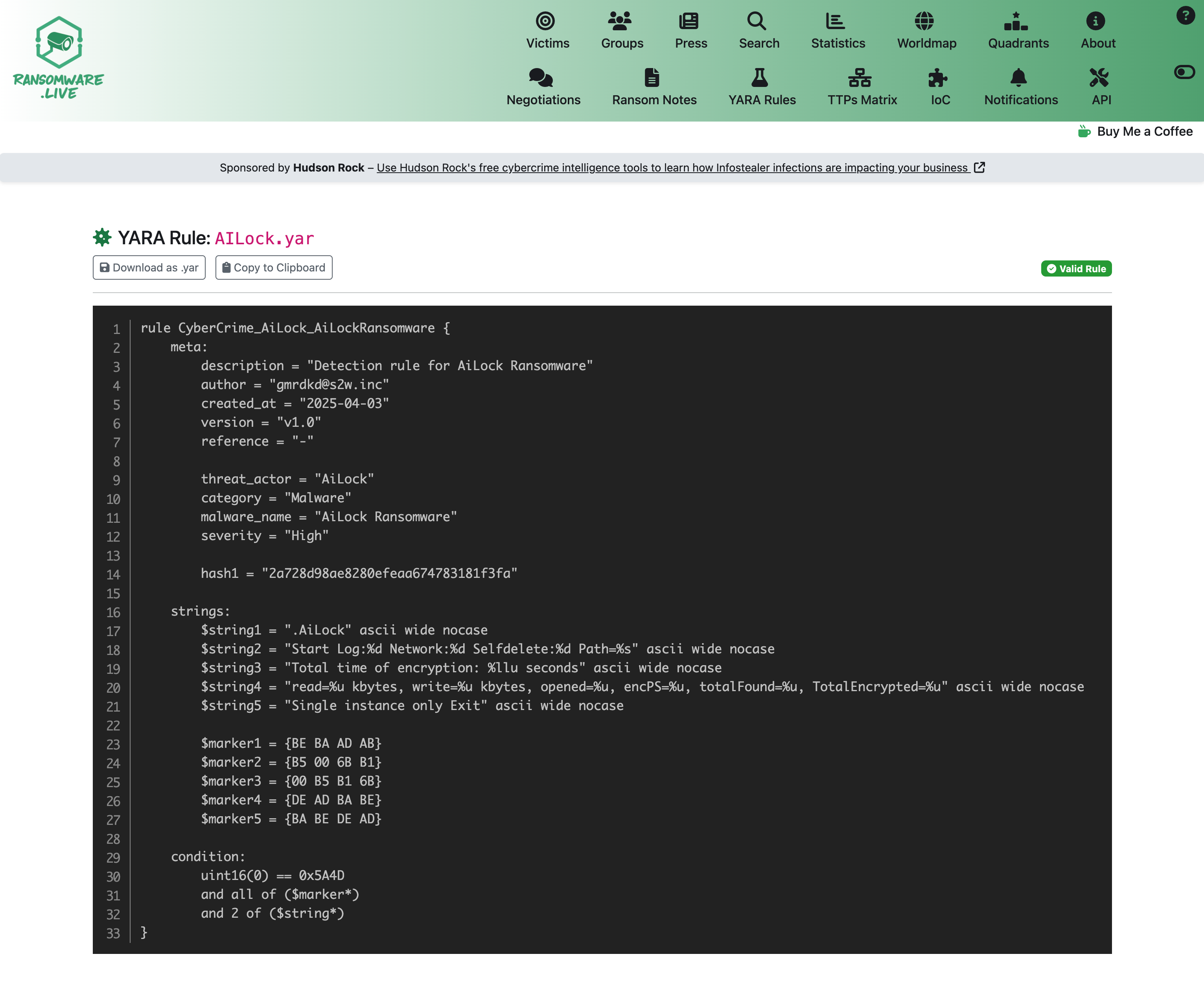
- YARA Rules Library - Detection rules categorized by ransomware groups, supporting direct downloads
These rules are written by security experts based on real attack samples, with quality far exceeding generic detection rules. The Ransomware.live YARA page allows you to view and manually obtain relevant YARA rules. Users can find specific rules as needed.
In addition to manual retrieval, the platform also offers a Pro API service. For Veeam users who need automated batch downloads, the structured API interface of the Pro version is particularly useful. We just need to get the relevant download API key through the “Get your free API Key” service.
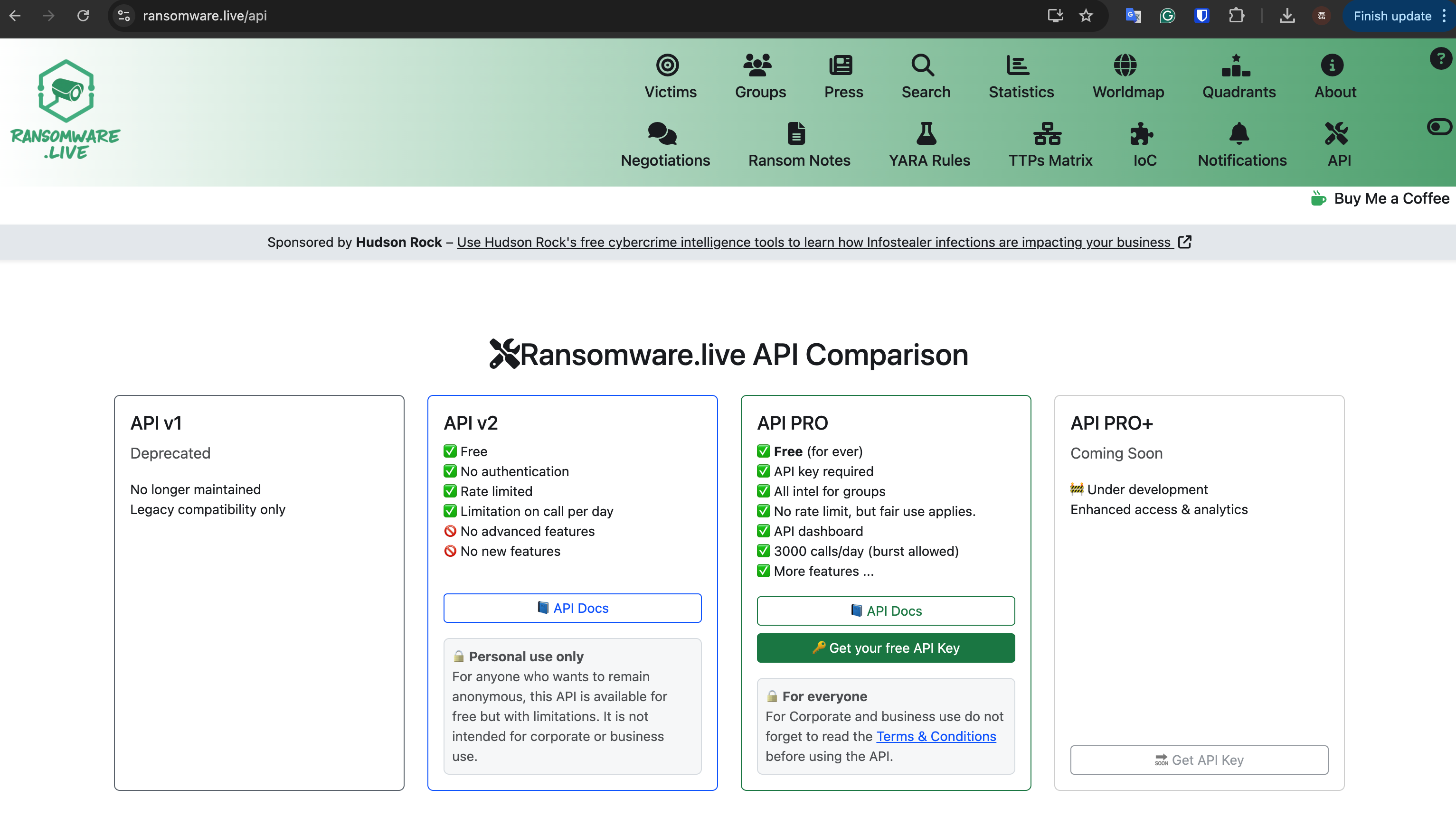
Pro API: Automated YARA Rule Acquisition
For users who need rules for offline use, I’ve provided a one-click script to download all rules, specifically designed for Veeam users. It can automatically download YARA rule files for all 62 groups. The script uses jq to parse JSON responses, automatically handles file naming and validation, and includes detailed download logs.
Complete Automated Download Script
#!/bin/bash
# Ransomware.live YARA Rules Complete Auto-Download Script
set -e
set -o pipefail

# User Configuration
TARGET_DIR="./yara_rules"
API_KEY="your-api-key-here"
API_BASE="https://api-pro.ransomware.live"

# Create Directory
mkdir -p "$TARGET_DIR"
LOG_FILE="${TARGET_DIR}/download_$(date +%Y%m%d_%H%M%S).log"

log() {
    echo "[$(date '+%Y-%m-%d %H:%M:%S')] $1" | tee -a "$LOG_FILE"
}

# Check Tools
if ! command -v jq >/dev/null 2>&1; then
    echo "Need to install jq: sudo apt-get install jq or brew install jq"
    exit 1
fi

log "Starting download of Ransomware.live YARA rules..."

# Get All Group YARA Rules
API_RESPONSE=$(curl -s -H "X-API-KEY: $API_KEY" "$API_BASE/yara")

if ! echo "$API_RESPONSE" | jq -e '.groups' >/dev/null 2>&1; then
    log "API response abnormal, please check API key"
    exit 1
fi

# Batch Download Rules
echo "$API_RESPONSE" | jq -r '.groups[].group' | while read -r group; do
    if [ -n "$group" ]; then
        log "Downloading: $group"

        YARA_RESPONSE=$(curl -s -H "X-API-KEY: $API_KEY" "$API_BASE/yara/$group")

        if echo "$YARA_RESPONSE" | jq -e '.rules[0]' >/dev/null 2>&1; then
            YARA_CONTENT=$(echo "$YARA_RESPONSE" | jq -r '.rules[0].content')
            FILENAME=$(echo "$YARA_RESPONSE" | jq -r '.rules[0].filename')

            if [ -n "$YARA_CONTENT" ] && [ "$YARA_CONTENT" != "null" ]; then
                OUTPUT_FILE="${TARGET_DIR}/${FILENAME:-${group}.yar}"
                echo "$YARA_CONTENT" > "$OUTPUT_FILE"

                if [ -s "$OUTPUT_FILE" ] && grep -q "^rule " "$OUTPUT_FILE"; then
                    RULE_COUNT=$(grep -c "^rule " "$OUTPUT_FILE")
                    log "✓ $(basename "$OUTPUT_FILE") (${RULE_COUNT} rules)"
                else
                    log "✗ Invalid file: $group"
                    rm -f "$OUTPUT_FILE"
                fi
            fi
        fi

        sleep 0.5
    fi
done

log "Download complete! Rule files saved in: $TARGET_DIR"
How to Use the Script
-
Environment Setup
# Install necessary tools sudo apt-get install curl jq # Ubuntu/Debian # or brew install curl jq # macOS -
Configure Script
# Modify TARGET_DIR to your target directory # Modify API_KEY to your actual API key chmod +x download_yara_rules.sh -
Run Script
./download_yara_rules.sh
Script Features:
- One-click download of YARA rules for all 62 ransomware groups, and if there are new rule updates later, this script can also get related updated rules with one click
- Automatic file naming and format validation
- Detailed download logs and error handling
- Support for custom download directories
Veeam Integration and Deployment Method
After the rules are downloaded, they can be uploaded and imported through the VBR console.
- Go to the VBR console, click the three dots at the bottom, and activate the Files window
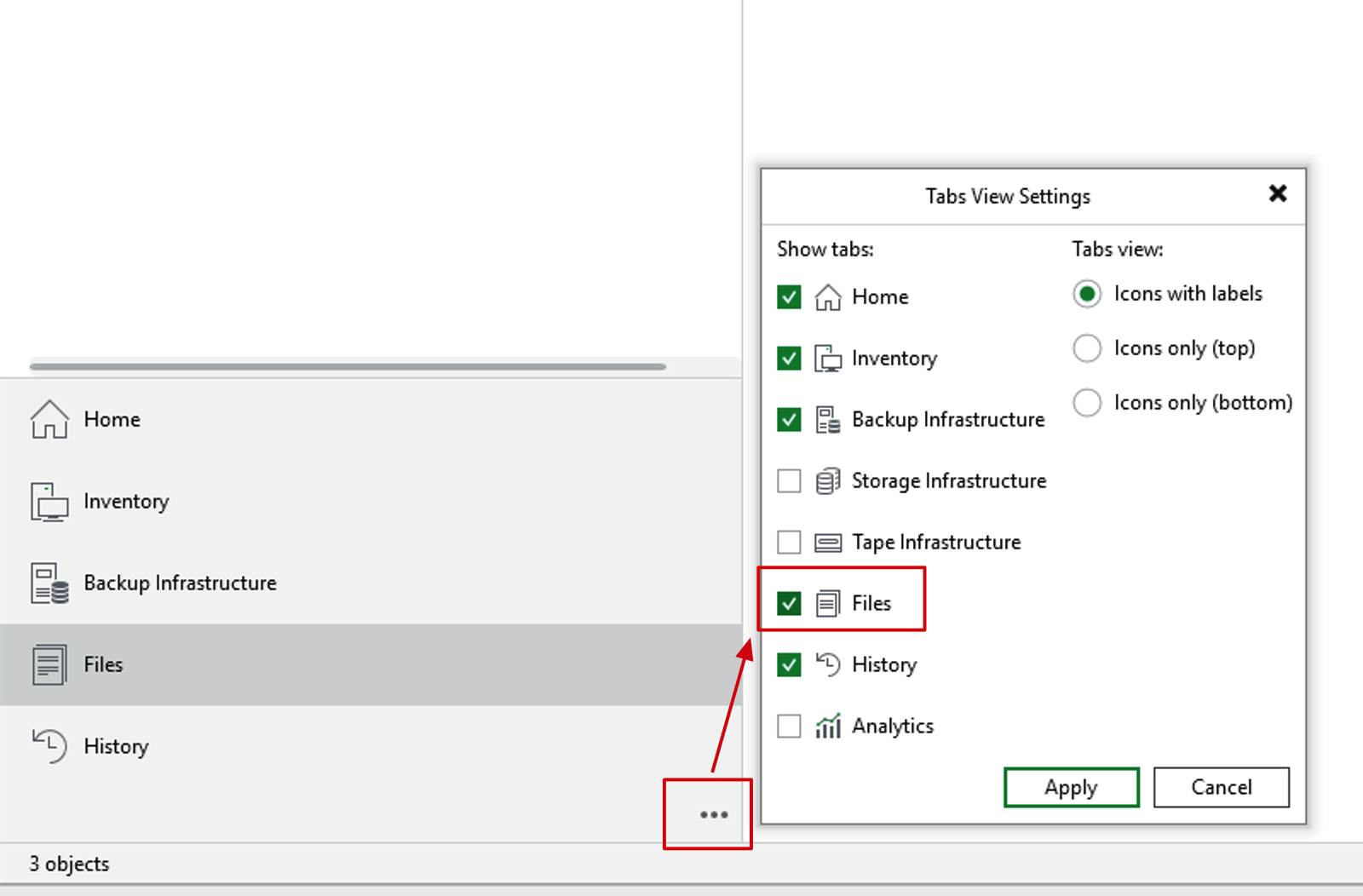
- In the Files window, you can see the folders of the current Windows machine where the Console is located and the VBR Server.
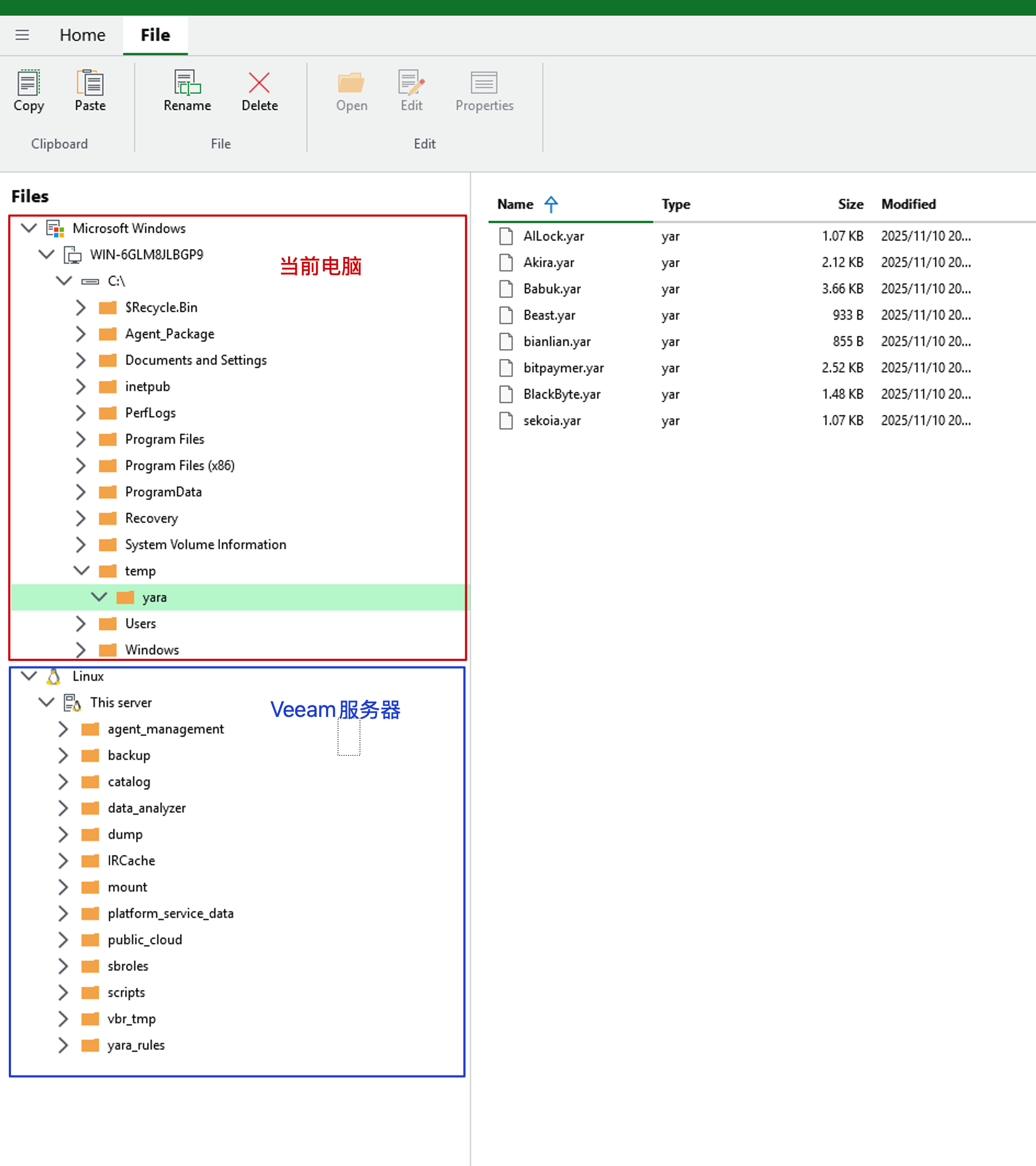
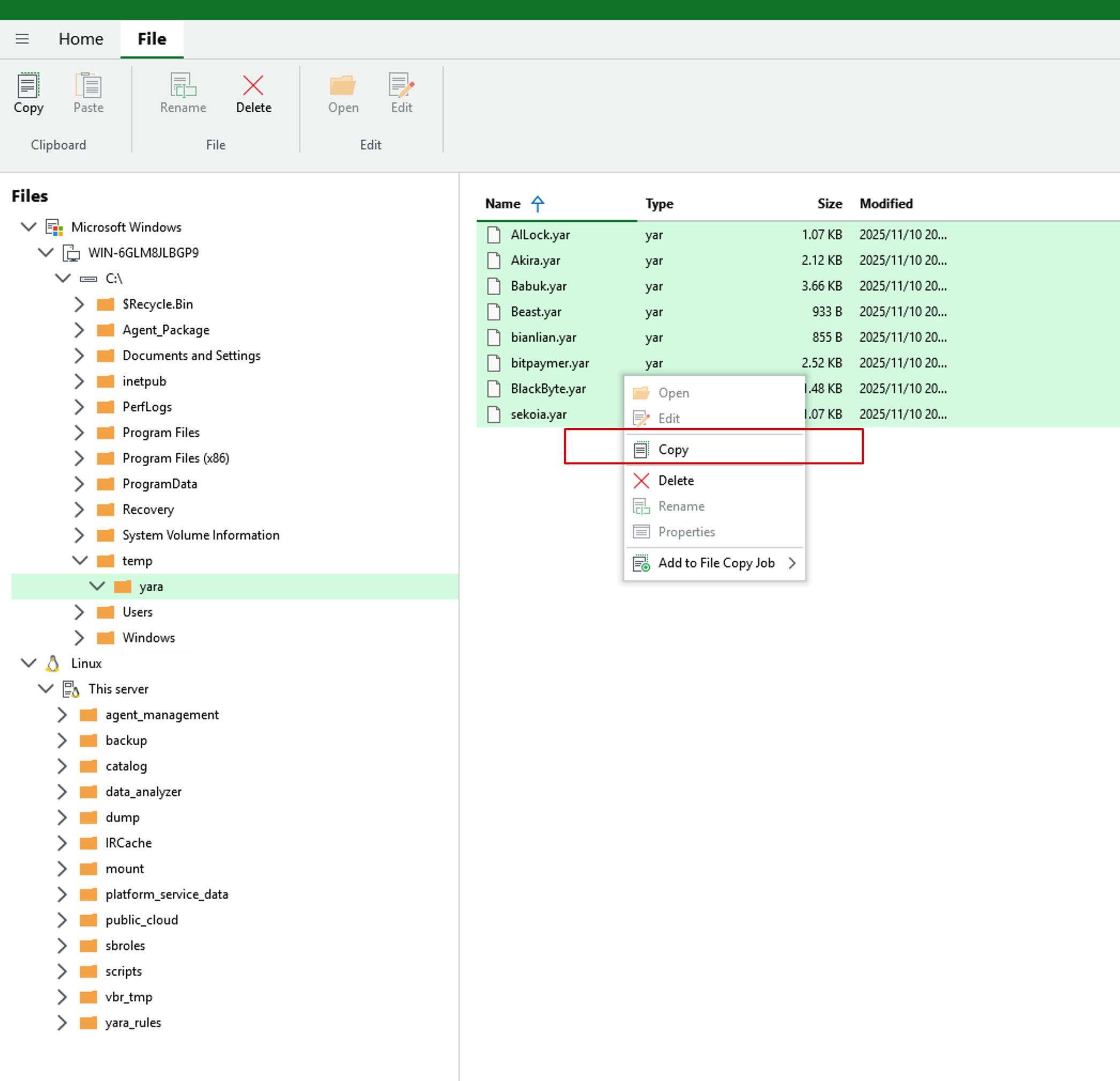
- From the YARA rules storage path on the current computer, select all rules you need to copy, right-click and click the Copy button.
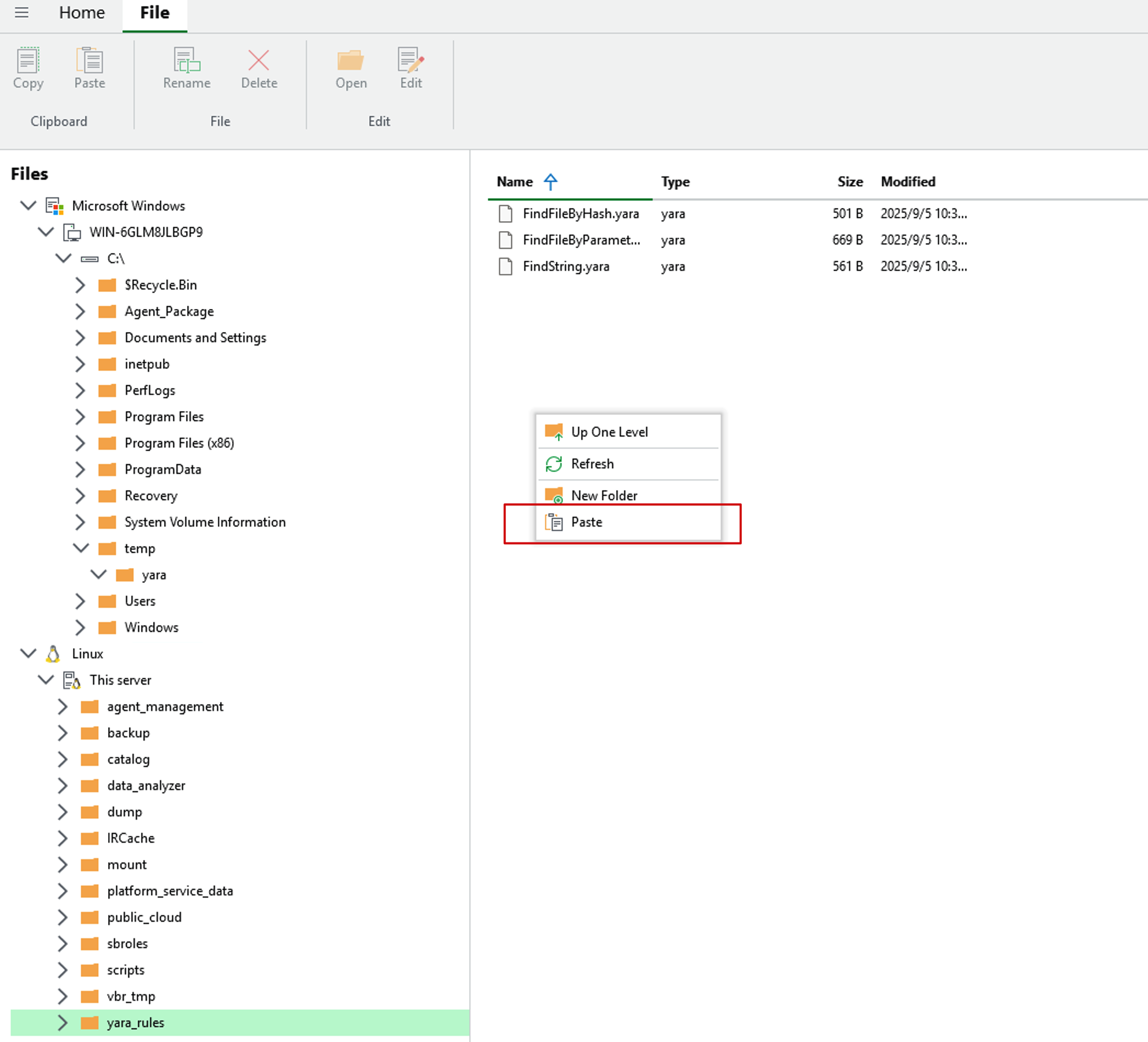
- Go to the yara_rules directory on the VBR Server, right-click and select the Paste button
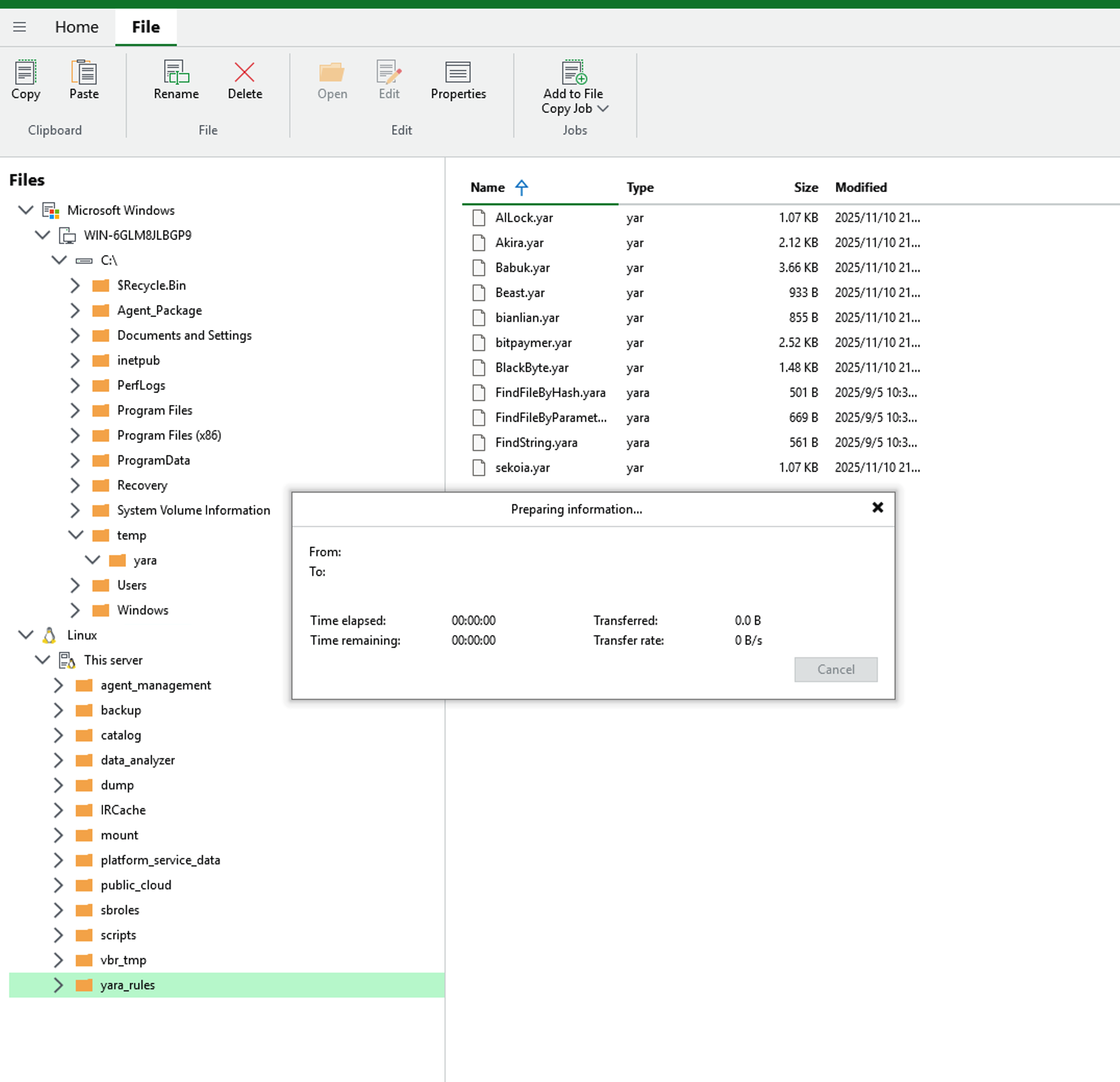
- After a short wait, the YARA rule files will be transferred to the VBR server.
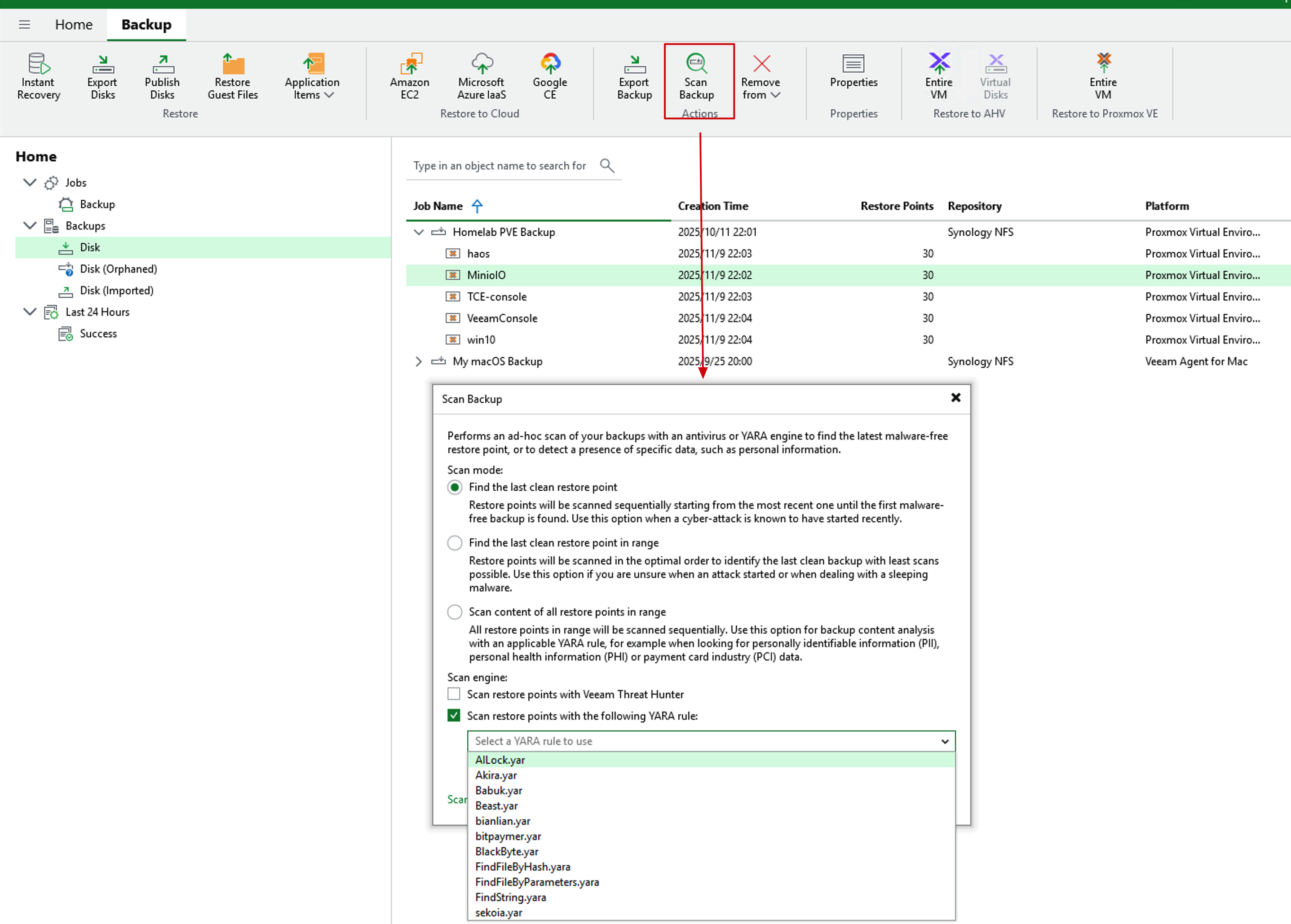
- Find any backup archive, select the Scan backup operation, and you can see the rule names in real-time in the YARA dropdown menu. Select them as scanning rules.
Summary
As a free open-source threat intelligence platform, Ransomware.live provides Veeam users with a zero-cost YARA rule enhancement solution. It currently includes 62 professional-level ransomware detection rules, continuously updated threat intelligence, plus automated download tools. This combination brings a qualitative improvement to Veeam v13’s malware detection capabilities. With the free Pro version RestAPI and my automatic download script, fully automated rule updates can be achieved.
Practical Application Recommendations:
- Regular Updates: Recommend running once a week to keep threat intelligence current
- Test and Verify: First verify the detection effectiveness of new rules in a test environment
- Monitor Logs: Pay attention to download success rates and file validity. If possible, perform manual verification
Facing increasingly complex ransomware threats, this free but professional threat intelligence source is worth the attention and use of every Veeam user. By properly configuring Ransomware.live’s YARA rules, you can significantly enhance Veeam environment’s ransomware detection and protection capabilities.