V13 Malware Detection Comprehensive Upgrade: Practical Evolution from Passive Protection to Active Response
In version v13, malware detection capabilities have achieved a significant leap forward. Compared to the real-time detection capabilities already available in the v12 era, v13 has brought qualitative improvements in threat response mechanisms, platform coverage, and intelligence levels. In my previous articles, I’ve detailed the ransomware attack detection principles and configuration methods for v12. Today, building on that foundation, let’s explore the key upgrades that v13 brings.
v12 Detection Capabilities Review: The Separation of Detection and Response
In the v12 era, Veeam’s malware detection primarily relied on two mechanisms:
- Inline Entropy Scan - Real-time analysis of entropy changes in data blocks during backup to detect encryption behavior
- Index Scan - Analysis of abnormal behavioral patterns through file system indexing
The characteristic of these two functions was that detection was separate from response - the system could detect threats in real-time, but the response process required manual intervention. In actual use of v12, this mechanism had several obvious limitations:
- Low response automation level: After detecting suspicious activity, it mainly relied on administrators to handle manually
- Limited platform support: Detection capabilities were mainly concentrated in Windows environments
- Insufficient in-depth analysis: Lacked further threat analysis capabilities after detecting threats
I believe v13 has made significant progress in this detection capability, beginning the evolution from “detection” to “intelligent response.”
V13 Active Response Mechanism: From Detection to Automatic Protection
Proactive Investigation: Enhanced Threat Verification Methods
The most important improvement in v13 is the introduction of the proactive backup scanning mechanism. The core idea of this feature is: once suspicious activity is detected during the backup process, the system immediately triggers more in-depth signature scanning, rather than waiting for users to make other manual judgments.
Settings in the software:
-
Open the VBR console, go to the Hamburger menu in the upper left corner →
Malware Detection Setting -
In the original
Signature Detectionsettings, v13 adds theProactive investigationoption:
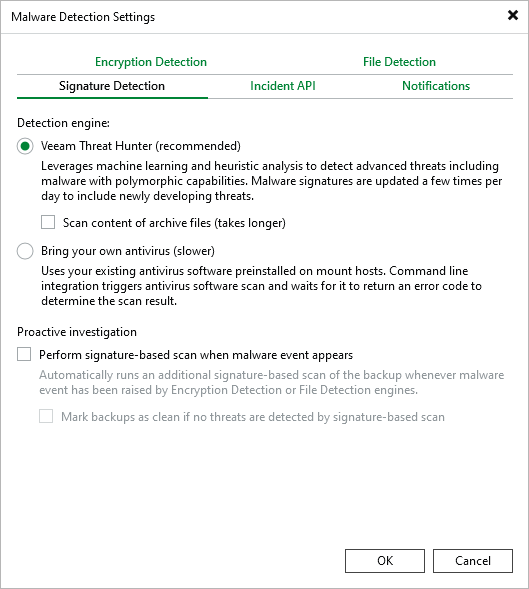
The first checkbox enables the proactive scanning mechanism, while the second option goes further - it allows the system to automatically resolve malware events based on scan results.
Practical usage effects:
In a simulated ransomware attack test environment, when a backup job detects large-scale file encryption:
- v12 detects malware: Marks the backup as Suspicious, sends alerts, waits for administrator handling
- v13 detects malware: Immediately triggers signature scanning, confirms the threat and directly marks it as Infected or, if no threat is found, re-marked as Clean.
In v12, I often heard from clients who discovered that Veeam reported backup archives as Suspicious status but didn’t know what happened or how to proceed. Now with this v13 option, we can wait no longer - Veeam immediately triggers detection to truly find out if there’s a problem.
Cross-Platform Unified Protection: Linux and Cloud Environments No Longer Forgotten Corners
Comprehensive Support for Linux Environments
Another breakthrough in v13 is full coverage of malware detection capabilities on the Linux platform, which I believe is also an important part of comprehensive Linux environment support.
Linux-supported detection capabilities:
- Suspicious file system activity analysis - Same detection logic as the Windows platform
- Veeam Threat Hunter scanning - Signature-based malware detection
- YARA rule support - Custom threat detection rules
Practical configuration points:
For malware detection in Linux environments, several special configurations need attention:
- File system selection: Special characteristics of certain file systems (such as Btrfs, ZFS) may affect detection accuracy
- Permission management: Ensure backup agents have sufficient permissions to read all files that need detection
- Performance impact: In resource-constrained Linux environments, you may need to adjust detection frequency
Specific operation steps:
For Agent-based Linux backups, malware detection configuration is basically consistent with Windows environments, mainly through global configuration in the VBR console’s Malware Detection settings, then enabling relevant functions in specific backup jobs.
Security Protection for Cloud Backups
As more users adopt public clouds, cloud environment security has become crucial. v13 extends malware detection capabilities to cloud backups:
Supported cloud platforms:
- Veeam Backup for Microsoft Azure
- Veeam Backup for AWS
- Veeam Backup for Google Cloud
Specific usage and configuration, including supported capabilities, are basically consistent with Linux, so I won’t elaborate further.
Antivirus Integration for Linux Mount Servers
v13 supports Linux Server as a Mount Server, and this is a fully functional Mount Server. The Secure Restore and Security Scan capabilities available on Windows Mount Servers are also extended to Linux Mount Servers, and likewise support Veeam Threat Hunter for signature scanning:
Announced supported antivirus software for Linux versions:
- ClamAV - Open source and free, suitable for budget-constrained environments
- ESET - Commercial solution with strong detection capabilities
- Sophos - Enterprise-level protection with user-friendly management interface
Configuration example:
Taking ClamAV as an example, you need to install ClamAV on the Linux mount server, then select the corresponding Linux server in the VBR console under Backup Infrastructure → Mount Servers. During use, both scan backup or Secure restore can call the antivirus software for scanning.
Summary and Recommendations
v13’s malware detection functionality represents a qualitative leap, evolving from the original passive detection to active protection. In actual deployment, I have several recommendations:
- Progressive approach: First verify all new features in a test environment, then gradually roll out to production environments
- Performance monitoring: Closely monitor the impact of new features on backup performance and make adjustments when necessary
- Policy optimization: Customize detection strategies according to business characteristics, avoiding one-size-fits-all configurations
- Regular drills: Conduct regular malware detection drills to ensure the effectiveness of response processes
These improvements in v13 show us the new positioning of backup systems in the overall security architecture - no longer just passive data protectors, but active participants in the security defense line. In actual use, properly configuring these features can significantly enhance an organization’s ability to respond to modern threats such as ransomware attacks.