VDP Security Series (Part 3) - Four-Eyes Authorization: Dual Control for Backup System Operations
Series Index
Data protection is more than just backup—it’s about securing your organization’s final line of defense. Veeam integrates security into every product detail through a zero-trust design philosophy. From the beginning of backup to the final step of recovery, Veeam continuously refines every feature to meet modern security requirements. This series covers new security features introduced in VDP v12, simple yet powerful capabilities that safeguard your data security.
- Part 1: Account-less and SSH service management for Linux backup agents
- Part 2: Using gMSA technology to manage Windows accounts
- Part 3: Four-Eyes Authorization: Dual control for backup system operations
- Part 4: Enabling Multi-Factor Authentication (MFA): Strengthening backup system account protection
- Part 5: Reducing network ports involved in backup operations
- Part 6: Using Syslog to manage logs in SIEM systems
Four-Eyes Authorization: Securing Veeam Backup Operations
In the digital age, data is the lifeblood of enterprises, making the security of backup and recovery operations particularly critical. A single misoperation or malicious act could lead to business interruption or data breaches. For this reason, Four-Eyes Authorization has gradually become an important strategy for organizations to protect their backup processes, building a solid security barrier for critical tasks through a dual-review mechanism.
Four-Eyes Authorization is a dual-authorization strategy widely used in finance, legal, and IT management fields to avoid errors or malicious actions caused by single-person operations. Introducing this mechanism in professional backup solutions like Veeam Data Platform effectively reduces the risks of privilege abuse and human configuration errors, significantly enhancing the security and transparency of data management.
This article provides an in-depth analysis of VDP Four-Eyes Authorization’s applicable scenarios, implementation steps, and considerations to help you build a more secure backup environment.
Four-Eyes Authorization Applicable Scenarios
In Veeam B&R, the following critical operations require Four-Eyes Authorization:
1. Backup Deletion Operations
- Deleting backup files, snapshots, or obsolete backup records.
2. Storage Infrastructure Management
- Deleting backup repositories or storage resources.
3. User Management and Authentication
- Adding, updating, or deleting users and user groups.
- Enabling or modifying multi-factor authentication (MFA).
- Adjusting automatic logout settings.
4. Veeam Cloud Connect Related Operations
- Service Providers: Deleting cloud repositories, deleting imported tenant backup files.
- Tenants: Deleting service providers, deleting backup files.
Additionally, Four-Eyes Authorization cannot protect already compromised servers, so for server protection, it’s recommended to combine infrastructure hardening and follow best practices.
Four-Eyes Authorization Workflow
Four-Eyes Authorization ensures operation security in VDP through the following mechanisms:
1. Creation of Operation Requests
When backup administrators submit sensitive operations, the system generates requests that require additional approval before execution.
2. Notification and Display of Approval Requests
- Veeam Console: Requests are displayed under the “Pending Approvals” node in the “Home” view.
- Email Notifications: Administrators configured with global notifications receive approval reminders.
3. Approval and Processing
As shown in the figure, the administrator or security administrator approval interface:
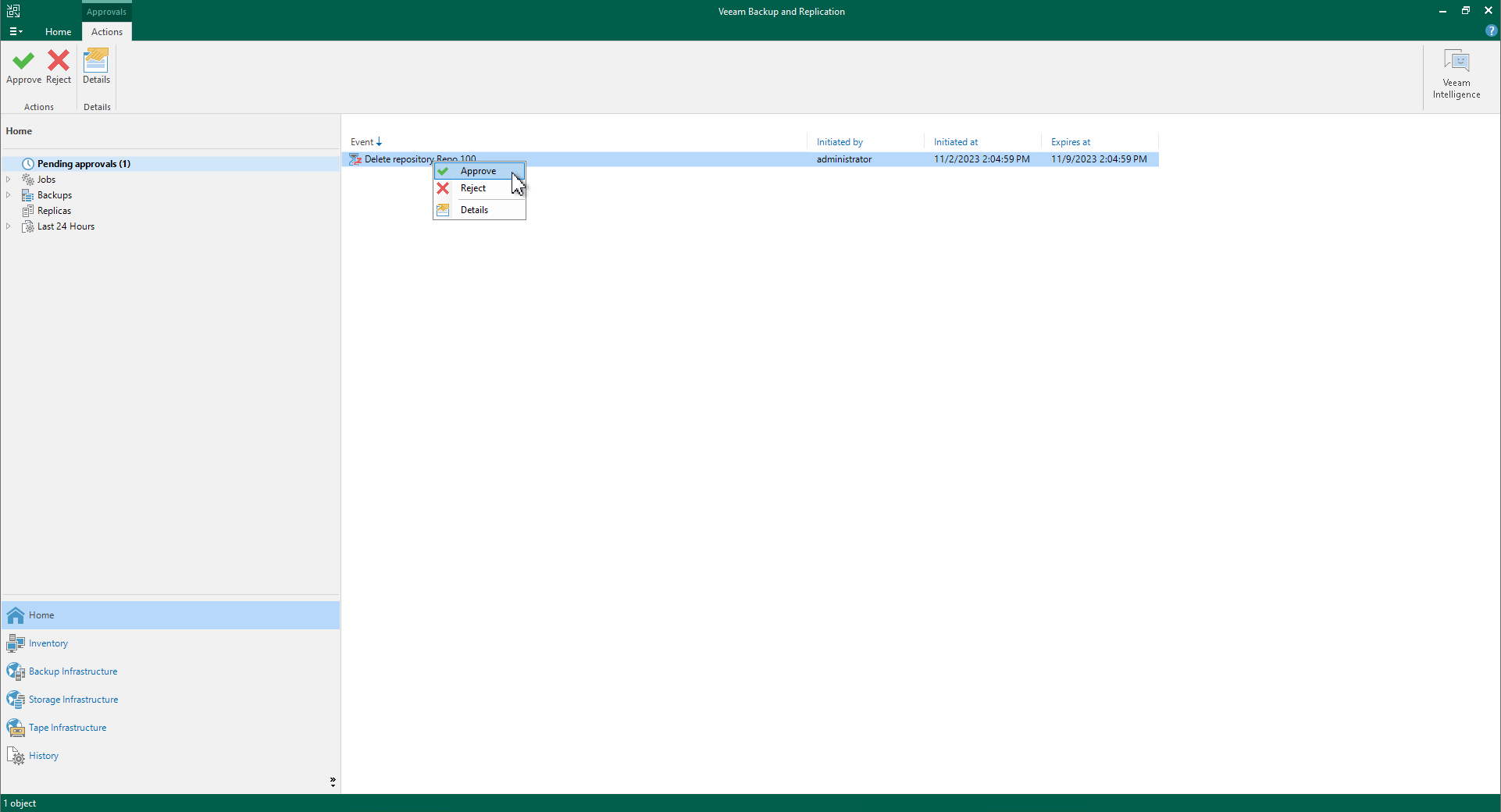
- Backup administrators or security administrators can approve or reject requests, supporting batch processing.
- Request creators can only cancel their submitted requests and cannot approve them themselves.
4. Automatic Rejection on Timeout
Requests not processed within the specified time (default 7 days) will be automatically rejected, avoiding risks from pending requests.
Prerequisites and Limitations
Prerequisites
- Feature is only available for Veeam Universal License or Enterprise Plus editions.
- After subscription license expiration, existing requests can still be processed, but new requests cannot be submitted.
Limitations
- Unsupported Operations:
- Performing deletion operations through PowerShell, REST API, or Veeam Backup Enterprise Manager.
- Editing, deleting, or renaming files/folders in the “Files” view.
- Task Locking Limitations:
- Locked objects (such as running backup jobs) cannot perform sensitive operations and need to be unlocked before resubmitting requests.
- Immutable Backup File Protection:
- Four-Eyes Authorization also cannot directly delete immutable backup files.
How to Configure Four-Eyes Authorization
1. User Role Configuration
Ensure at least two users have one of the following roles:
- Veeam Backup Administrator
- Veeam Security Administrator
2. Enable Four-Eyes Authorization
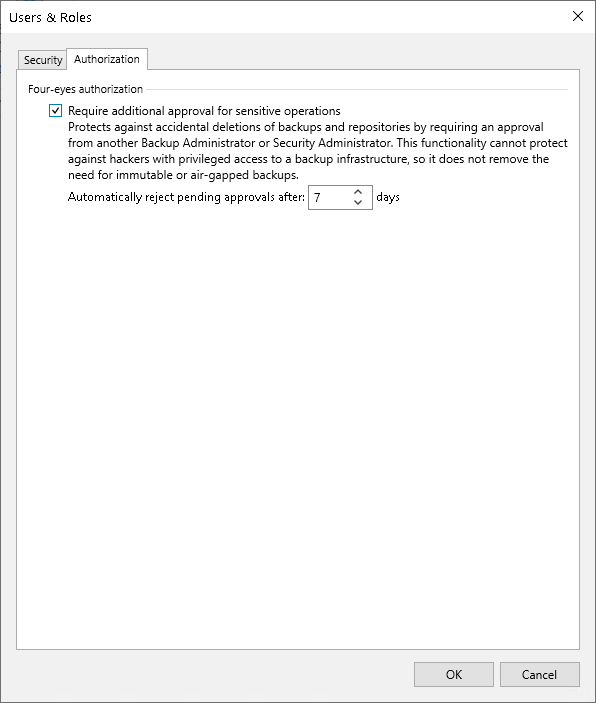
- Open Users and Roles > Authorization settings.
- Check the Require additional approval for sensitive operations option.
- Set the approval request validity period (1 to 30 days).
3. Disable Four-Eyes Authorization
Disabling the feature also requires approval from another administrator, ensuring the security of setting changes.
Operation Logs: Recording Every Authorization Step
Through operation logs, administrators can track Four-Eyes Authorization related activities:
-
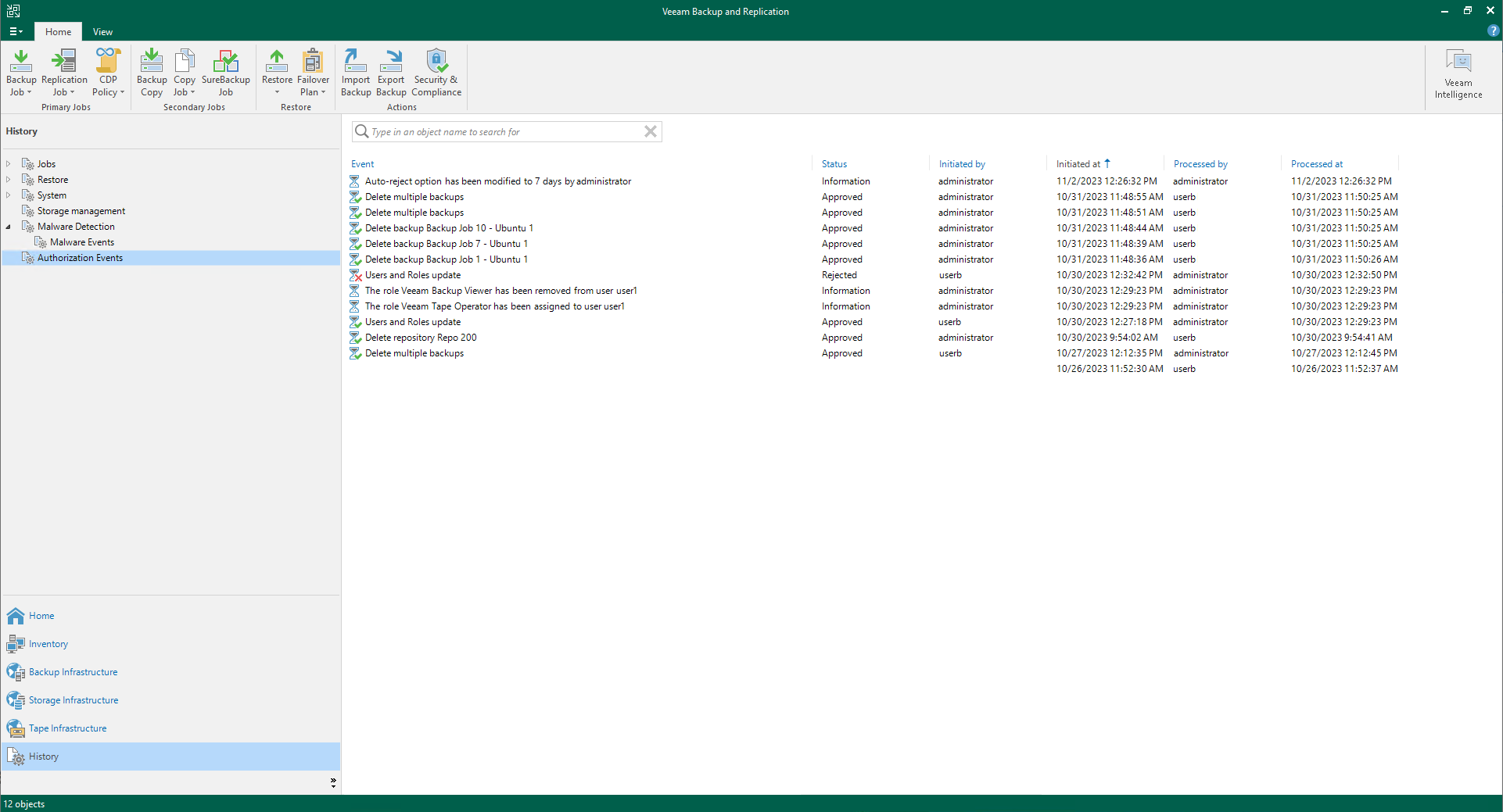
Go to the History view and click the Authorization Events node.
-
View log content, including:
- Approval/rejection records.
- Four-Eyes Authorization setting adjustments.
- User and user group management operations.

Summary
Four-Eyes Authorization adds an additional security barrier to backup operations, reducing the risk of single-person errors and privilege abuse. Combined with Veeam’s other security features such as permission management, data encryption, and immutable backups, organizations can build more robust backup strategies.
For those already using Veeam, enable Four-Eyes Authorization now to protect your data security and safeguard your organization’s development.