Veeam Agent for Linux Installation Deep Dive
1. Components & Roles
Veeam Agent for Linux (VAL) has two parts: the Veeam binaries and the VeeamSnap kernel module. On CentOS/Red Hat, you typically install:
veeam-<version>.rpm
veeamsnap-<version>.rpm
VeeamSnap handles snapshots and CBT; the Veeam package installs everything else. When you install veeam, it automatically pulls in veeamsnap as a dependency.
2. Installation Path
VAL relies on the distro’s package manager to fetch dependencies (see “Veeam Agent for Linux Basics”). Push installs from VBR hide the complexity, but special cases exist.
2.1 DKMS-Based Builds
VeeamSnap is an out-of-tree kernel module, so Veeam uses DKMS. During rpm -ivh veeamsnap..., the module is registered with DKMS, compiled, and installed.
DKMS (Dynamic Kernel Module Support) is Dell’s open-source project; more info: https://www.cnblogs.com/wwang/archive/2011/06/21/2085571.html. For compilation to succeed, DKMS needs GCC, make, kernel headers, etc. VeeamSnap pulls those dependencies automatically.
2.2 Precompiled Packages (kmod-veeamsnap)
For certain distros Veeam ships prebuilt modules: kmod-veeamsnap-<version>.rpm. They provide the same functionality but skip DKMS. Supported OS versions include:
- RHEL 6 (kernel ≥ 2.6.32-131.0.15)
- CentOS/RHEL 7.0–7.9 (kernel ≥ 3.10.0-123)
- RHEL/CentOS 8
- SLES / openSUSE
Packages live at http://repository.veeam.com/.private/rpm. Because the installer chooses the correct module via a Python 3 script, your system must have Python 3 available.
2.3 Secure Boot (UEFI)
If Secure Boot is enabled, import the VeeamSnap certificate before installing kmod-veeamsnap. Steps (example for RHEL 8):
curl -O http://repository.veeam.com/.private/rpm/el/8/x86_64/veeamsnap-ueficert-5.0.1.4493-1.noarch.rpm
rpm -ivh veeamsnap-ueficert*
mokutil --import veeamsnap-ueficert.crt
Then reboot, enter UEFI, and enroll the certificate. After that, install kmod-veeamsnap as usual.
2.4 Going Snapless
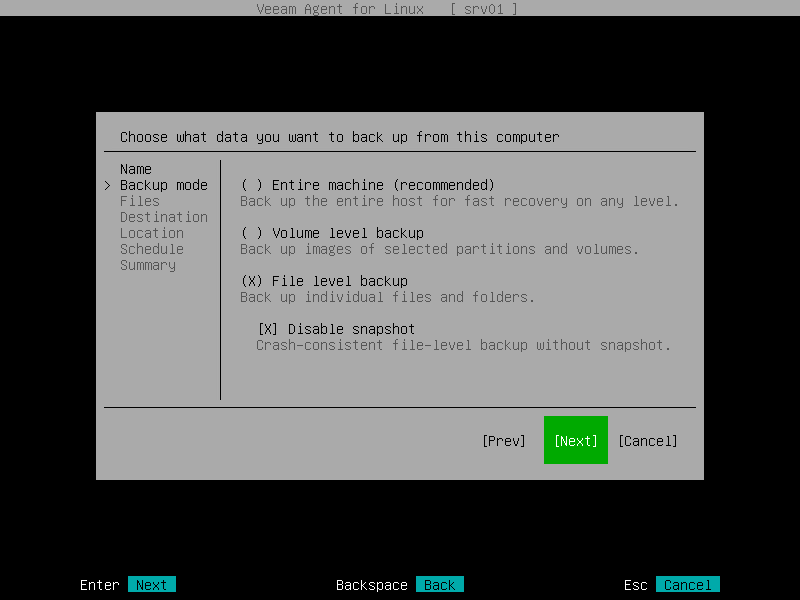
From VAL 5.0.1 onward, Veeam offers a snapless mode (veeam-nosnap-<version>.rpm). Example for RHEL 8:
http://repository.veeam.com/.private/rpm/el/8/x86_64/veeam-nosnap-5.0.1.4493-1.el8.x86_64.rpm
This mode doesn’t use VeeamSnap and supports only file-level backups:
VBR exposes the same option:
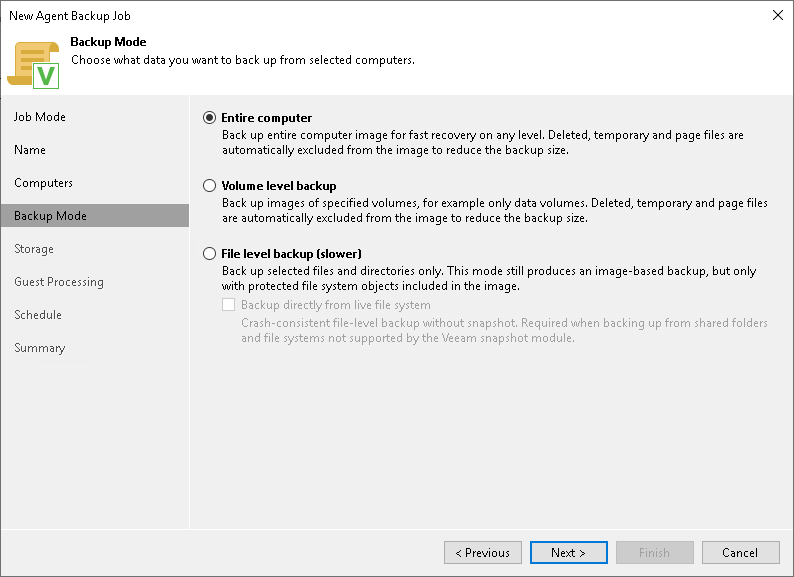
You can install the nosnap package standalone; it doesn’t depend on VeeamSnap, though other dependencies are still resolved via the package manager.
Hope this breakdown helps when deploying VAL in different environments.***