Free Tools Done Right
Great tools shouldn’t come with hidden strings attached. As IT administrators, we’re always hunting for utilities that make our lives easier without breaking the budget. That’s why I’m excited about Veeam’s Community Edition—a complete toolkit that’s genuinely free, not just a trial in disguise.
Beyond their flagship Veeam Availability Suite, Veeam provides every IT admin with a full set of Community Edition tools. No ads, no usage limits, no nagging upgrade prompts. They’re not quite open source, but they’re completely free to use. Think of them as Veeam’s gift to the IT community.
While some advanced features and license counts are limited compared to commercial versions, the core capabilities are impressive. For detailed comparisons, check Veeam’s official comparison matrix: https://www.veeam.com/products-edition-comparison.html
The best part? Veeam Backup & Replication Community Edition offers five powerful capabilities you can use right now without consuming any licenses—not even the 10 free instances that come bundled. Let me show you what makes this a must-have tool in your virtualization toolkit.
1. VeeamZIP – The Power of a Full Backup in a Simple Package
VeeamZIP has been a cornerstone feature since Veeam’s very first release. The name tells the story—it essentially packages an entire VMware or Hyper-V virtual machine into a single compressed archive, much like creating a ZIP file of your documents. But this is far more than basic compression.
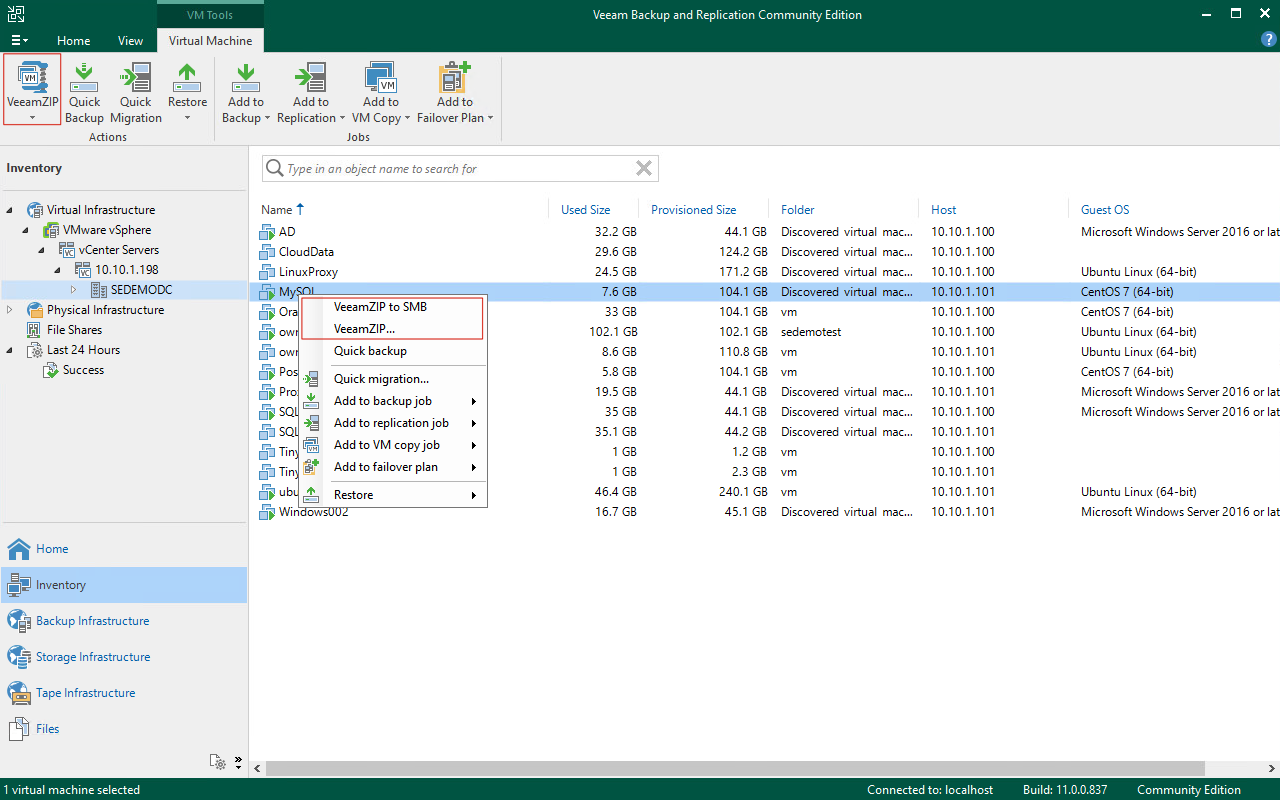
Under the hood, VeeamZIP leverages Veeam’s full backup engine. Each time you run a VeeamZIP operation, you’re creating a complete full backup that results in a .vbk file. This isn’t a limited, watered-down backup—it’s the real deal, treated as a first-class citizen in Veeam’s ecosystem.
When disaster strikes, every Veeam recovery method is at your disposal:
- Instant VM Recovery – Boot directly from the backup, including v11’s cross-platform recovery to VMware or Hyper-V
- Instant Disk Recovery – Mount individual virtual disks without full VM recovery
- Entire VM Restore – Complete restoration of the virtual machine
- Virtual Disk Restore – Recover specific virtual disks
- VM File Restore – Extract individual files from the VM
- Guest File Recovery – Granular file-level recovery inside the guest OS
- Application Item Recovery – Restore specific application objects
- Cloud Migration – Restore directly to Amazon EC2 or Microsoft Azure
Here’s the game-changing part: VeeamZIP is truly unlimited. Whether you have 100 ESXi hosts, 1,000 virtual machines, or 1 petabyte of data, you can use VeeamZIP to create compressed archives without consuming a single one of those 10 built-in Community Edition licenses. No limits, no catches—just powerful backup functionality.
2. Unlock Your Storage Array’s True Potential
Storage snapshot integration typically belongs to Veeam’s enterprise editions. It’s one of those powerful features that often sits unused because it requires understanding both virtualization and storage infrastructure. But if your organization uses any of these enterprise storage systems, you’re in for a treat:
- NetApp arrays
- Dell EMC SC Series or Unity
- HPE 3PAR or Nimble storage
- Lenovo V-series or DM-series
- Huawei OceanStore systems

Veeam Community Edition gives you unlimited access to restore directly from storage snapshots—completely free. This capability transforms your existing storage investment into a powerful recovery solution. Using Veeam’s storage snapshot parsing and recovery engine, any volume snapshot on these supported arrays can leverage Veeam’s full recovery toolkit:
- Instant VM Recovery from Snapshots – Boot VMs directly from storage snapshots
- Instant Disk Recovery from Snapshots – Mount individual virtual disks from snapshots
- Guest File Recovery from Snapshots – Extract files from snapshot-based VMs
- Application Item Recovery – Restore specific application objects (SQL, Oracle, Exchange, Active Directory, and more)
Since this recovery capability doesn’t require backup jobs to run, it remains completely license-free regardless of your environment’s scale. Whether you have 100 ESXi hosts, 10 enterprise storage arrays, 1,000 virtual machines, or 1PB of data—restoring from storage snapshots costs nothing.
This is essentially a free upgrade for your existing storage infrastructure. If you’ve been told that storage snapshots aren’t user-friendly for recovery, give this a try. You might be amazed at how Veeam transforms your snapshots into production-ready recovery points.
3. Finally, Affordable Tape Management
Here’s a scenario that sounds familiar to many IT administrators: you purchase a tape library, then discover you need expensive backup software to actually use it. Even worse, many backup vendors charge per tape drive—adding another drive could mean hundreds of thousands in licensing fees.

Veeam Community Edition completely changes this equation. Tape library management and usage are entirely free. You can leverage the File to Tape functionality to write any dataset to tape without worrying about licensing costs.
The unlimited nature of this feature is remarkable:
- 1 tape drive or 100 tape drives – no additional licensing required
- 10 tapes or 10,000 tapes – write as much as you need
- Millions of files or 1PB of data – scale without limits
Next time you’re evaluating tape management solutions, don’t rush into expensive commercial software. A single Veeam Community Edition installation gives you everything you need for tape operations without the licensing headaches.
4. The Hidden Gem: FastSCP
This feature might be unfamiliar to most Veeam users, even seasoned veterans. But if you’ve been following Veeam since 2008, you’ll remember it well. FastSCP was Veeam’s very first product—the one that started it all.

Today, FastSCP lives within the Files view in Veeam Backup & Replication Community Edition. Every operation in this view leverages FastSCP’s capabilities. It provides efficient data transfer between any servers managed by Veeam, using Veeam’s high-performance data movers.
The practical value is substantial. Need to move large files between ESXi hosts? FastSCP handles it seamlessly. Need to copy files between virtual machines? No problem.
But here’s where it gets really clever: FastSCP includes online editing capabilities for VMware configuration files like VMX files and VMDK descriptor files. No more SSHing into ESXi shells to edit configuration files—you can make changes directly through the Veeam console.
Like all the features we’ve covered, FastSCP usage is unlimited across all managed servers. Transfer as much data as you need without touching any licenses.
5. Quick Migration – Your vMotion Safety Net
Every VMware administrator faces this dilemma: you need to move a virtual machine, but vMotion just isn’t viable. Maybe the CPUs are incompatible, the network infrastructure won’t cooperate, or licensing constraints prevent live migration. You’re stuck wondering whether to migrate at all.

Veeam’s Quick Migration steps in precisely when vMotion can’t handle the job. It orchestrates a Veeam-assisted migration that gets the job done with minimal downtime. While not as seamless as live migration, it provides a reliable fallback when you need to move workloads between incompatible environments.
The beauty of Quick Migration in Community Edition? It’s completely unlimited and license-free. Whether you need to migrate one VM or hundreds, the feature works without consuming any of those precious Community Edition licenses.
Quick Migration accepts that some downtime is inevitable in these scenarios but minimizes it as much as possible. You get the migration completed—sometimes with a brief interruption—but without the licensing overhead that commercial solutions would require.
The Bottom Line
These five capabilities—VeeamZIP, storage snapshot recovery, tape management, FastSCP, and Quick Migration—make Veeam Community Edition a permanent fixture in any IT administrator’s toolkit. It brings tremendous convenience to virtualization operations without the licensing complexity that plagues so many enterprise tools.

What I love about Community Edition is its honesty. It’s genuinely free, not a trial that expires after 30 days or a limited version that nags you to upgrade constantly. It’s powerful, functional, and ready for production use in environments of any size.
When you’re ready to expand beyond these capabilities, the upgrade path is straightforward. Veeam Backup Essentials or the full Veeam Availability Suite offer additional features like advanced backup job scheduling, WAN acceleration, and enterprise reporting—all built on the same solid foundation you’re already using.
For now, download Community Edition and put it through its paces. I’m confident you’ll find it as valuable as I have in daily IT operations. It’s the kind of tool that makes you wonder why more software isn’t this straightforward.