VMware VAIO Overview
Next week, Veeam is releasing the highly anticipated v11 version of their flagship VAS suite, and the crown jewel feature is Veeam CDP. I know many of you have been waiting for this functionality for quite some time—and with good reason. After nearly five years of meticulous development and refinement, Veeam is finally bringing this feature to market in v11.
What makes this CDP implementation particularly fascinating from a technical perspective is how fundamentally different it is from traditional backup and replication approaches. Since Veeam CDP leverages VMware-related technologies in ways we haven’t seen before, I wanted to give you a comprehensive primer on the underlying VMware technologies and APIs that power this feature. Understanding these foundations will help you appreciate the technical sophistication and be better prepared for deployment.
Introduction to vSphere APIs for I/O Filtering
Veeam CDP is built on VMware’s vSphere APIs for I/O Filtering (VAIO) technology. This technology first appeared in vSphere 6.0U1 and really came into its own starting with vSphere 6.5. At its core, VAIO is a framework that enables applications to insert I/O filters directly into a virtual machine’s I/O path. These filters can capture VM I/O operations, allowing for various processing operations before the I/O is written to physical disk.
VMware defines four primary use cases for I/O filters:
- Replication - Creating redundant copies of data for high availability
- Caching - Accelerating I/O performance through intelligent buffering
- Storage I/O Control - Managing and prioritizing storage resources
- Encryption - Securing data through cryptographic protection
The latter two use cases—Storage I/O Control and Encryption—are currently reserved for VMware’s own use. However, the Replication and Caching scenarios are open to third-party vendors to create their own solutions. Just as backup solutions leverage the VADP interface, third-party solutions utilizing VAIO must undergo rigorous VMware Ready certification. Once certified, these components appear in VMware’s official compatibility listings.
Technical Architecture of VAIO
VAIO consists of two main components. The first part is VMware’s VAIO Filter Framework, which is standardized and built into every ESXi host. This framework has been integrated into the ESXi core since vSphere 6.0U1. The second part consists of the individual I/O filters themselves, which run sequentially within the VAIO Filter Framework.
As you can see in the diagram below, when a virtual machine is running, its I/O path flows from the guest operating system through the VAIO Filter Framework before reaching the VMDK. As I/O passes through the VAIO Filter Framework, it gets processed by each filter defined in the framework. Only after all filters in the VAIO Filter Framework complete their processing does the I/O request get written to the final VMDK.

It’s worth noting that VAIO operates on a per-virtual-machine basis. The VAIO framework defines specific filters available to each VM, so if any I/O errors occur—even at the filter level—they’re strictly isolated to that particular virtual machine. This isolation ensures that individual VM or filter issues don’t impact the entire ESXi host or other running virtual machines.
Additionally, the VAIO framework imposes some important limitations. I/O filters are categorized by use case into four main classes, and only one filter of each class can exist simultaneously on each ESXi host. For example, if Veeam’s CDP replication filter is already installed, other vendors’ replication filters cannot be installed on that same ESXi host.
VAIO Management Best Practices
Typically, beyond built-in I/O filters, third-party I/O filters are deployed through integrated installation services provided by the vendor. This means you won’t find installation buttons in the vSphere Client. However, administrators can easily monitor VAIO deployment and usage across their clusters and ESXi hosts through the vSphere Client interface.
Viewing at the Cluster Level
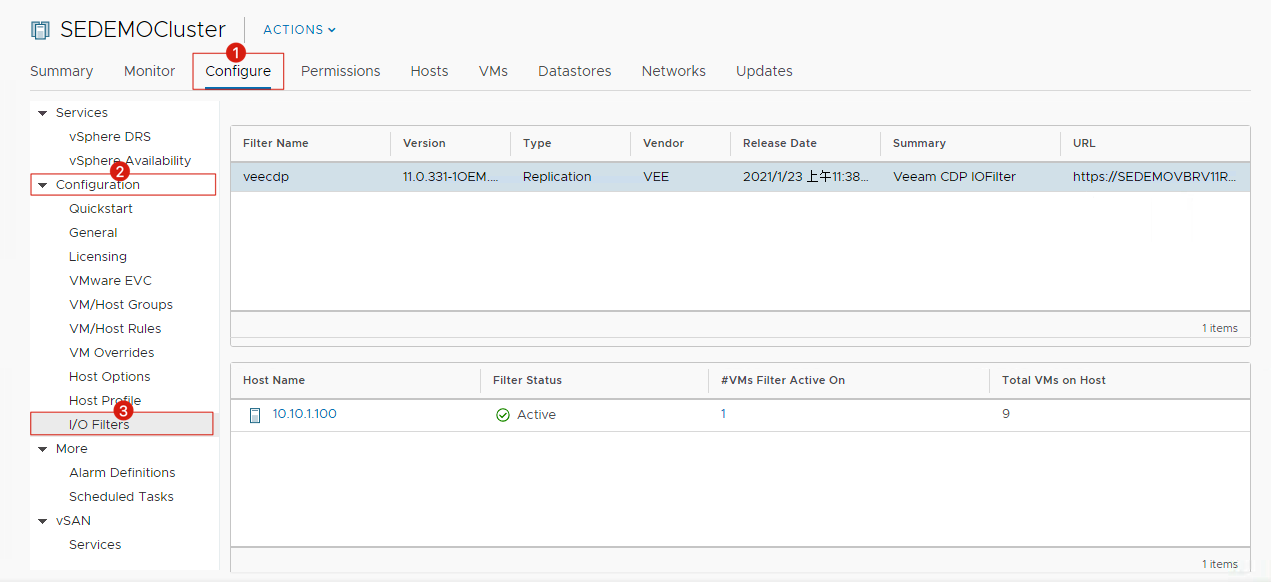
To check your cluster’s VAIO status, select the desired cluster, navigate to the Configure tab, and locate I/O Filters under the Configuration section. This view shows you the installation status of filters across your cluster:
Viewing at the ESXi Host Level
For host-specific information, select the target ESXi host, go to the Configure tab, and find I/O Filters under the Storage section. This displays the filters installed on that specific ESXi host:
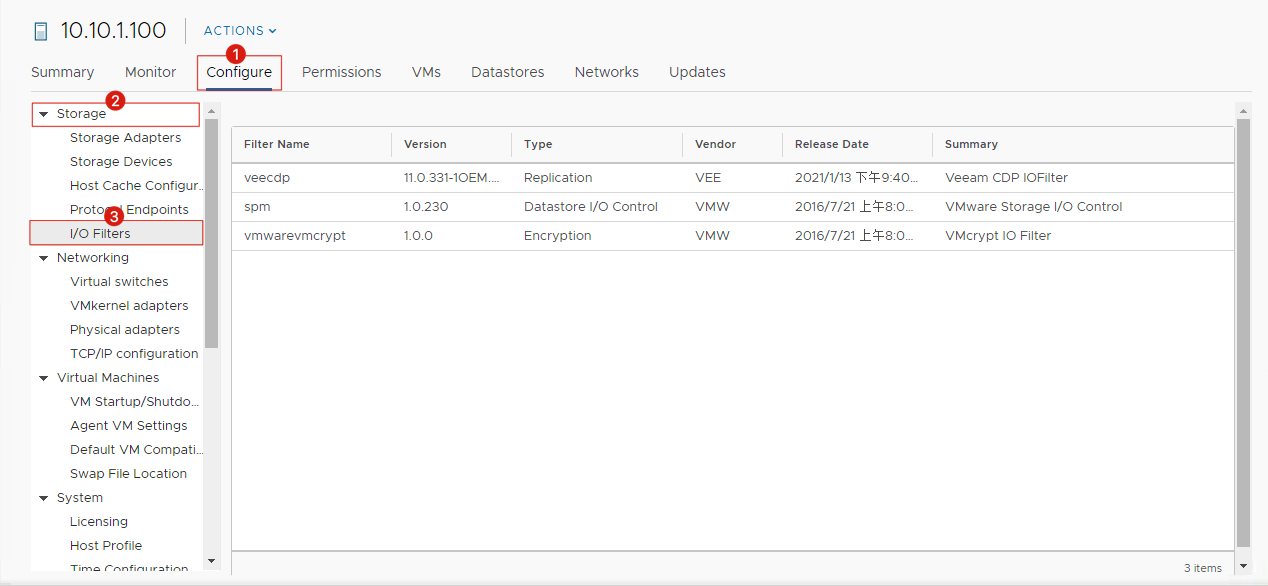
You’ll notice that the ESXi view reveals slightly different information than the cluster view, including two filter types used by VMware itself: spm (used for datastore I/O control) and vmwarevmcrypt (used for encryption).
Pay special attention to the Type column in the display—this shows each filter’s category, and as mentioned earlier, there can be only one filter per type.
I/O Filter Storage Policies
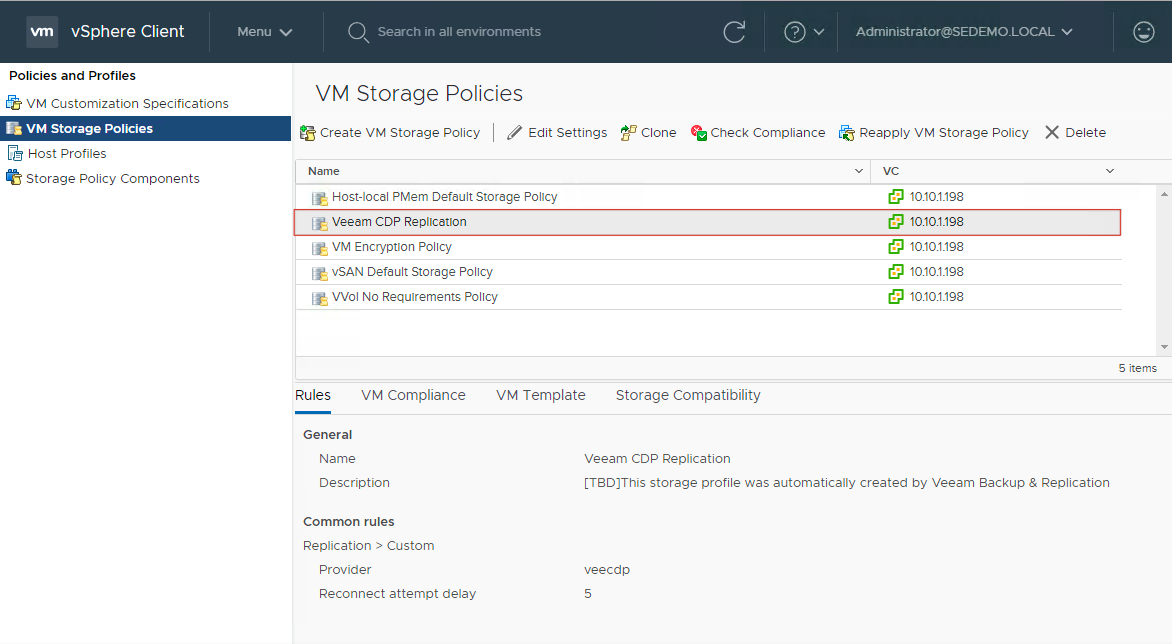
I/O filters must be used in conjunction with vSphere VM Storage Policies. Typically, third-party software will automatically configure the relevant VM Storage Policies during deployment. Once configured, you can find these policies in the vSphere Client under VM Storage Policies. For instance, here’s what the Veeam CDP filter policy looks like:
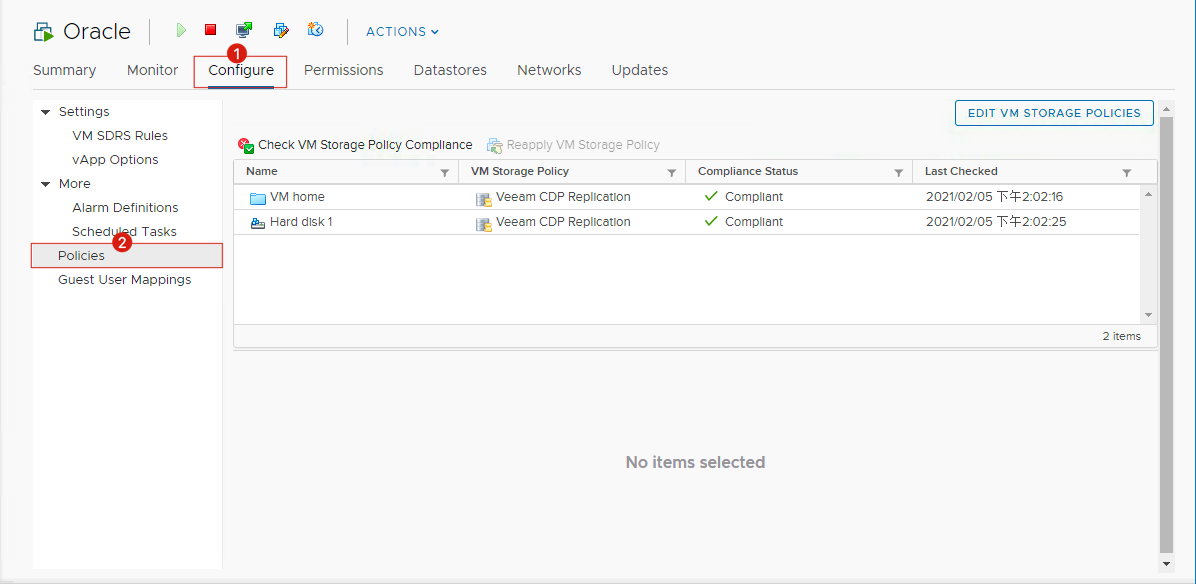
When a virtual machine is using I/O filters for processing, you can select the VM and navigate to Configure → Policies to see current policy usage and assignment status:
VAIO Installation and Troubleshooting Guide
Since VAIO consists of a framework and filters, and the framework is integrated into ESXi, most potential issues you’ll encounter will be related to the filters themselves—particularly during the installation process. However, filter installation follows the standard ESXi VIB package installation process, which means troubleshooting is relatively straightforward.
Here are the key areas to check when troubleshooting installation issues:
- URL Accessibility: Can the VIB package URL be accessed properly?
- Package Integrity: Is the VIB package provided by the vendor correct?
- Maintenance Mode: During upgrade and uninstallation, are ESXi hosts in the correct maintenance mode state?
- Host Reboot Requirements: VIB package installation may require ESXi host restarts
- Maintenance Mode Automation: Did automatic maintenance mode transitions fail?
- Filter Conflicts: Is there a conflict with VIB packages from other similar filters?
To check the status of installed packages, select an ESXi host, navigate to Configure → System → Packages to view the VIB package inventory:
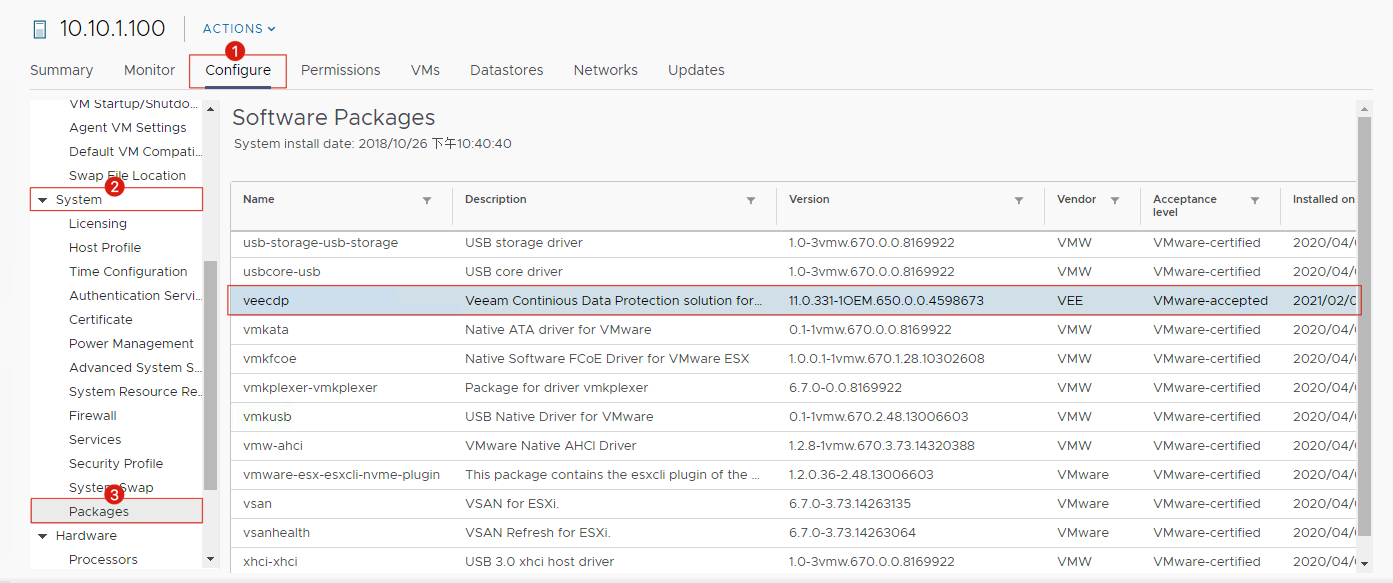
That concludes our overview of VMware VAIO technology. I hope this information helps you better understand the foundations that Veeam CDP is built upon as we approach the v11 release. The sophisticated use of VAIO represents a significant step forward in virtual machine protection, and understanding these underlying technologies will serve you well as you plan your implementation strategy.