Is the Data Integration API “just an API”?
When Veeam released V10 it added a brand-new capability tucked away behind PowerShell cmdlets and a rather intimidating name: Data Integration API. Many admins saw the term and assumed they’d need to write code, so they never looked deeper.
What It Actually Does
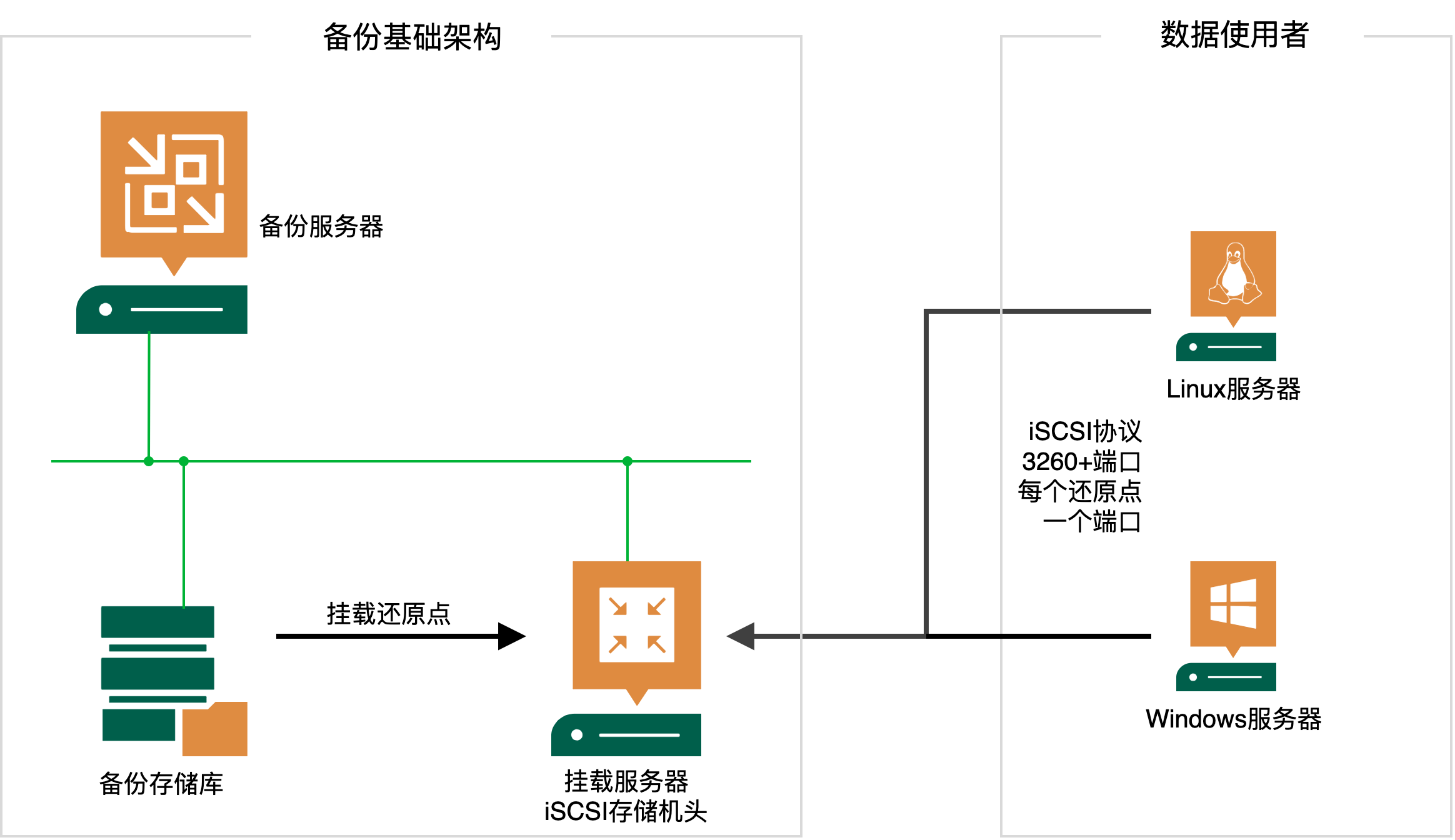
In reality, the feature is straightforward. It uses Windows’ iSCSI services to publish Veeam backup data as iSCSI disks. Think of it as a new data-lab use case: any image-level backup can be presented to a Windows or Linux host over iSCSI—no VMware or Hyper-V required. Supported sources include:
- VMware image backups
- VMware replicas
- Hyper-V image backups
- Hyper-V replicas
- Veeam Agent for Windows
- Veeam Agent for Linux
How It Works
After the API call, the VBR mount server behaves like an iSCSI array. You pick the backup/replica restore point, VBR publishes it, and consumers connect via the iSCSI protocol to access the volumes.
Using It
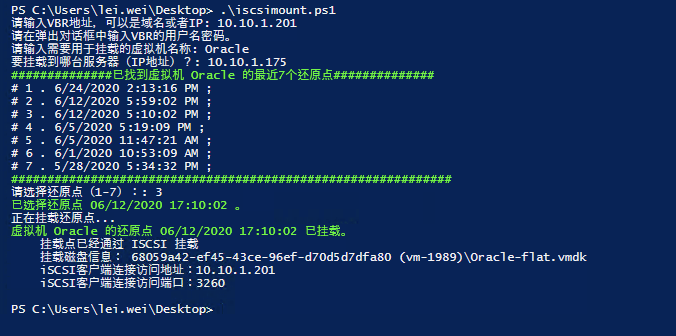
Because it’s exposed through APIs, there’s no GUI button—but that doesn’t stop us. At the end of this post you’ll find a PowerShell script. Copy it into a .ps1 file on the VBR server and run it interactively; it will walk you through the prompts and publish the selected restore point over iSCSI.
Sample output in PowerShell:
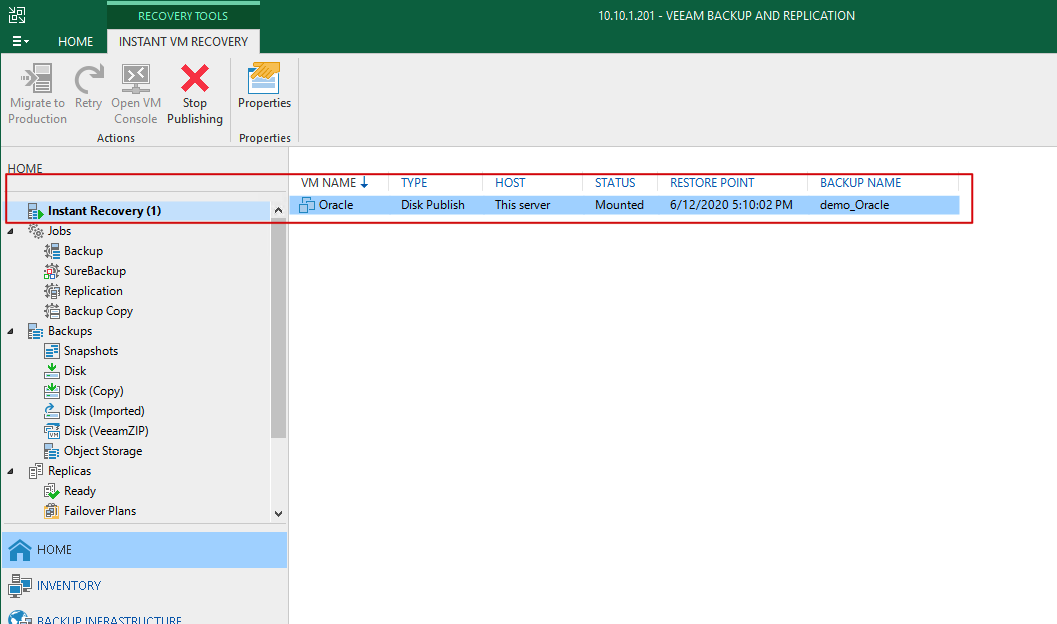
Inside VBR you’ll see the published disk listed similar to an Instant Recovery session:
Next, go to the iSCSI initiator on the target host (in this example, 10.10.1.175) and connect to the mount server (10.10.1.201, port 3260).
When you’re finished, don’t forget to click Stop Publishing in VBR to tear down the session.
Sample Script
# Sample script for Veeam Data Integration API
# Publishes backup data over iSCSI to a specified host
# Requires at least 7 restore points (adjust as needed)
# Currently targets VMware/Hyper-V backups; modify for Agents, Backup Copy, Replication, etc.
#
# Author: Wei Lei
# Email: lei.wei@veeam.com
# Version: v1.1
################# Update log ######################
# Stops immediately when VBR credentials fail
# Stops automatically if no restore point is selected
###################################################

# Script Start
# VBR Server (Server Name, FQDN or IP)
$vbrServer = Read-Host "请输入 VBR 地址,可以是域名或者 IP"
# VBR Credentials
Write-Host "请在弹出对话框中输入 VBR 的用户名密码。"
$Credential=Get-Credential -Message 请输入 VBR 的用户名密码
$vbrusername = $Credential.Username
$vbrpassword = $Credential.GetNetworkCredential().password

#region Connect
# Load Veeam Snapin
If (!(Get-PSSnapin -Name VeeamPSSnapIn -ErrorAction SilentlyContinue))
{
    If (!(Add-PSSnapin -PassThru VeeamPSSnapIn))
    {
        Write-Error "Unable to load Veeam snapin" -ForegroundColor Red
        Exit
  }
}

# Connect to VBR server
$OpenConnection = (Get-VBRServerSession).Server
If ($OpenConnection -ne $vbrServer)
{
    Disconnect-VBRServer
    Try
    {
        Connect-VBRServer -user $vbrusername -password $vbrpassword -server $vbrServer -ErrorAction Stop
    }
    Catch
    {
        Write-Host "无法连接到 VBR 服务器 - $vbrServer" -ForegroundColor Red
        exit
    }
}
#endregion

$VMName = Read-Host "请输入需要用于挂载的虚拟机名称"
$IP =Read-Host "要挂载到哪台服务器(IP 地址)?"
$backup = Get-VBRBackup
$backup = @($backup | ?{$_.JobType -eq "Backup"})
$points = Get-VBRRestorePoint -Backup $backup -Name $VMName | Sort-Object –Property CreationTime –Descending | Select-Object -First 7
if ($points -eq $null)
{
    Write-Host "找不到这台虚拟机的还原点。 - $VMName" -ForegroundColor Red
    exit
}

While($InNumber -ne 7)
    {
    Write-Host "##############已找到虚拟机 $VMName 的最近 7 个还原点##############" -ForegroundColor Green
    $i = 0
    foreach ($pt in $points)
    {
    $ptctime = $pt.CreationTime
    $i = $i + 1
    Write-Host "#" $i . $ptctime ";"
    }
    Write-Host "#############################################################" -ForegroundColor Green

    $InNumber = Read-Host "请选择还原点(1-7)"
    $ss =@()

    switch($InNumber)
    {
        1
        {
            $pt = $points | Select-Object -Index 0
            $pttime = $pt.CreationTime
            Write-Host "已选择还原点 $pttime 。" -ForegroundColor Green
            $ss = Publish-VBRBackupContent -RestorePoint $pt -AllowedIps $IP -RunAsync
        }
        2
        {
            $pt = $points | Select-Object -Index 1
            $pttime = $pt.CreationTime
            Write-Host "已选择还原点 $pttime 。" -ForegroundColor Green
            $ss = Publish-VBRBackupContent -RestorePoint $pt -AllowedIps $IP -RunAsync
        }
        3
        {
            $pt = $points | Select-Object -Index 2
            $pttime = $pt.CreationTime
            Write-Host "已选择还原点 $pttime 。" -ForegroundColor Green
            $ss = Publish-VBRBackupContent -RestorePoint $pt -AllowedIps $IP -RunAsync
        }
        4
        {
            $pt = $points | Select-Object -Index 3
            $pttime = $pt.CreationTime
            Write-Host "已选择还原点 $pttime 。" -ForegroundColor Green
            $ss = Publish-VBRBackupContent -RestorePoint $pt -AllowedIps $IP -RunAsync
        }
        5
        {
            $pt = $points | Select-Object -Index 4
            $pttime = $pt.CreationTime
            Write-Host "已选择还原点 $pttime 。" -ForegroundColor Green
            $ss = Publish-VBRBackupContent -RestorePoint $pt -AllowedIps $IP -RunAsync
        }
        6
        {
            $pt = $points | Select-Object -Index 5
            $pttime = $pt.CreationTime
            Write-Host "已选择还原点 $pttime 。" -ForegroundColor Green
            $ss = Publish-VBRBackupContent -RestorePoint $pt -AllowedIps $IP -RunAsync
        }
        7
        {
            $pt = $points | Select-Object -Index 6
            $pttime = $pt.CreationTime
            Write-Host "已选择还原点 $pttime 。" -ForegroundColor Green
            $ss = Publish-VBRBackupContent -RestorePoint $pt -AllowedIps $IP -RunAsync
        }
        Default
        {
        Write-Error "请输入 1-7 之间的数字!"
        Invoke-Command {exit}
        }
    }
    Write-Host "正在挂载还原点。.."
    $state = $ss.StateString
    $ssid = $ss.id
    While ($state -ne "Virtual disks published...")
    {
        Start-Sleep -s 5
        $ss = Get-VBRPublishedBackupContentSession
        $sss = $ss | ?{$_.id -eq $ssid}
        $state = $sss.StateString
    }
    Write-Host "虚拟机 $VMName 的还原点 $pttime 已挂载。" -ForegroundColor Green
    $mountinfo = Get-VBRPublishedBackupContentInfo -Session $sss
    $mountinfomode = $mountinfo.mode
    $mountinfoserverip = $mountinfo.serverips
    $mountinfoserverport = $mountinfo.serverport
    $mountinfodiskname = $mountinfo.disks.diskname
    Write-Host "    挂载点已经通过 $mountinfomode 挂载"
    Write-Host "    挂载磁盘信息: $mountinfodiskname "
    Write-Host "    iSCSI 客户端连接访问地址:$mountinfoserverip "
    Write-Host "    iSCSI 客户端连接访问端口:$mountinfoserverport "
    Invoke-Command {exit}
}